힉스필드 Genjutsu → 크리젠 재현 정본
2026-11-21 최종 · 기획자는 결과와 판정을, 개발(Claude Code)은 이 페이지만 보고 그대로 만들 수 있게 썼습니다. 힉스필드 화면의 두 탭 «동작 옮기기(Motion transfer)»·«물건 바꾸기(Objects swap)»을 큰 줄기로 나눴습니다.
0. 결론 — 리버스 엔지니어링 끝
힉스필드 Genjutsu 의 영상은 전부 «Seedance 2.5» 한 모델이 만듭니다. 크리젠으로 같은 모델을 같은 값으로 부르면 같은 결과가 나옵니다.
① 동작 옮기기 = Seedance 2.5 «reference» · ② 물건 바꾸기 = Seedance 2.5 «editing» · ③ 그림체 = ①에 «첫 장면 그림 한 장»을 더한 것.
결과 영상의 크기·장면 수는 모든 시험(사용자 업로드 21편 · 견본 · 그림체 20개)에서 힉스필드와 똑같았습니다.
| 무엇 | 판정 | 근거 (아래 절) |
|---|---|---|
| 동작 옮기기 | 같음 | 견본 1 + 사용자 업로드 6 · 6 중 5 같음 1 거의 같음 (A) |
| 물건 바꾸기 | 같음 | 견본 1 + 사용자 업로드 12 · 같음 10 · 거의 같음 1 · 무작위 1 (B) |
| 그림체 — 영상 만드는 단계 | 같음 | 그림체 20개 모두 시험 · 첫 장면 그림을 힉스필드 것으로 넣으면 17/17 같음 (A+) |
| 그림체 — 첫 장면 그림 단계 | 비슷한 수준까지 | 힉스필드 비공개 그림 AI. 우리는 GPT 그림 편집으로 대신 · 5편 중 2편 비슷 3편 덜 과감 (A+) |
| 내 그림 화풍(Custom) | 구조 같음 | 그림 → AI 가 화풍 설명을 씀 → 그림체와 같은 흐름 (A++) |
| 배경 지정(화면엔 없음) | 같음 | (C) |
남은 한 가지 · 품질 영향: 그림체를 고를 때 «첫 장면을 그 그림체로 다시 그리는» 그림 AI 와 지시문은 힉스필드가 공개하지 않습니다(서버 안). 영상 품질은 이 한 장에 따라갑니다. 힉스필드 그림을 넣으면 같아지는 것으로 증명했고, 우리 그림 AI 로는 «비슷 ~ 덜 과감»입니다. 개선 방법은 A+ 끝에 적었습니다. 동작 옮기기·물건 바꾸기는 남은 것이 없습니다.
1. 힉스필드 화면 — 두 탭과 «그림체»
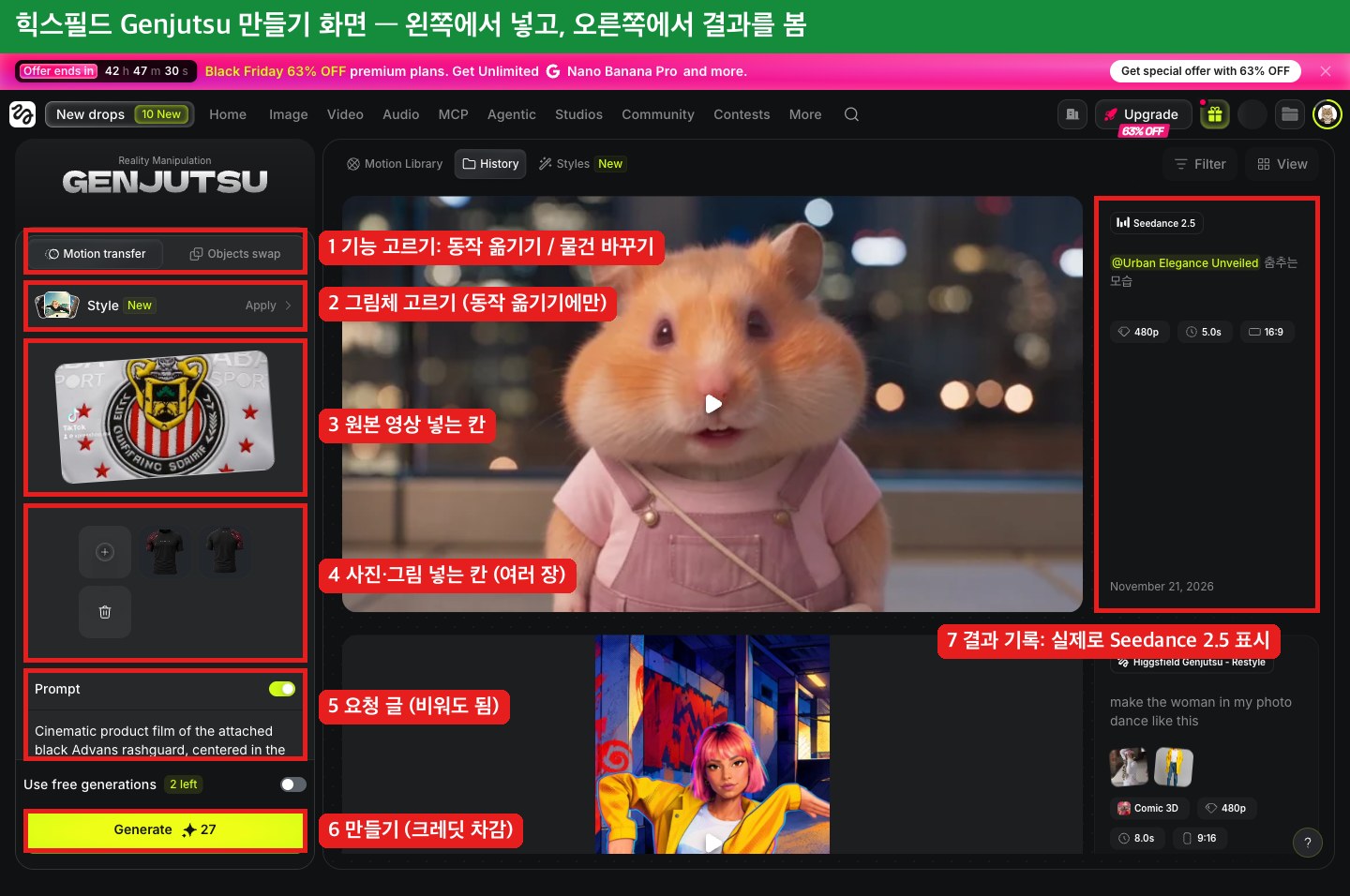
| 화면 | 사용자가 넣는 것 | 힉스필드가 서버에 보내는 작업 |
|---|---|---|
| 동작 옮기기 탭 | 춤·동작 영상 1 + 내 사진 1~N + 한 줄 글(선택) | hf_mult_motion_control |
| 동작 옮기기 탭 + 그림체 고름 | 위와 같음 + 그림체 카드 1개 | restyle (+ preset_id) |
| 물건 바꾸기 탭 | 영상 1 + 바꿀 물건·사람 그림 1~N + 한 줄 글(필수) | hf_mult_replace_object |
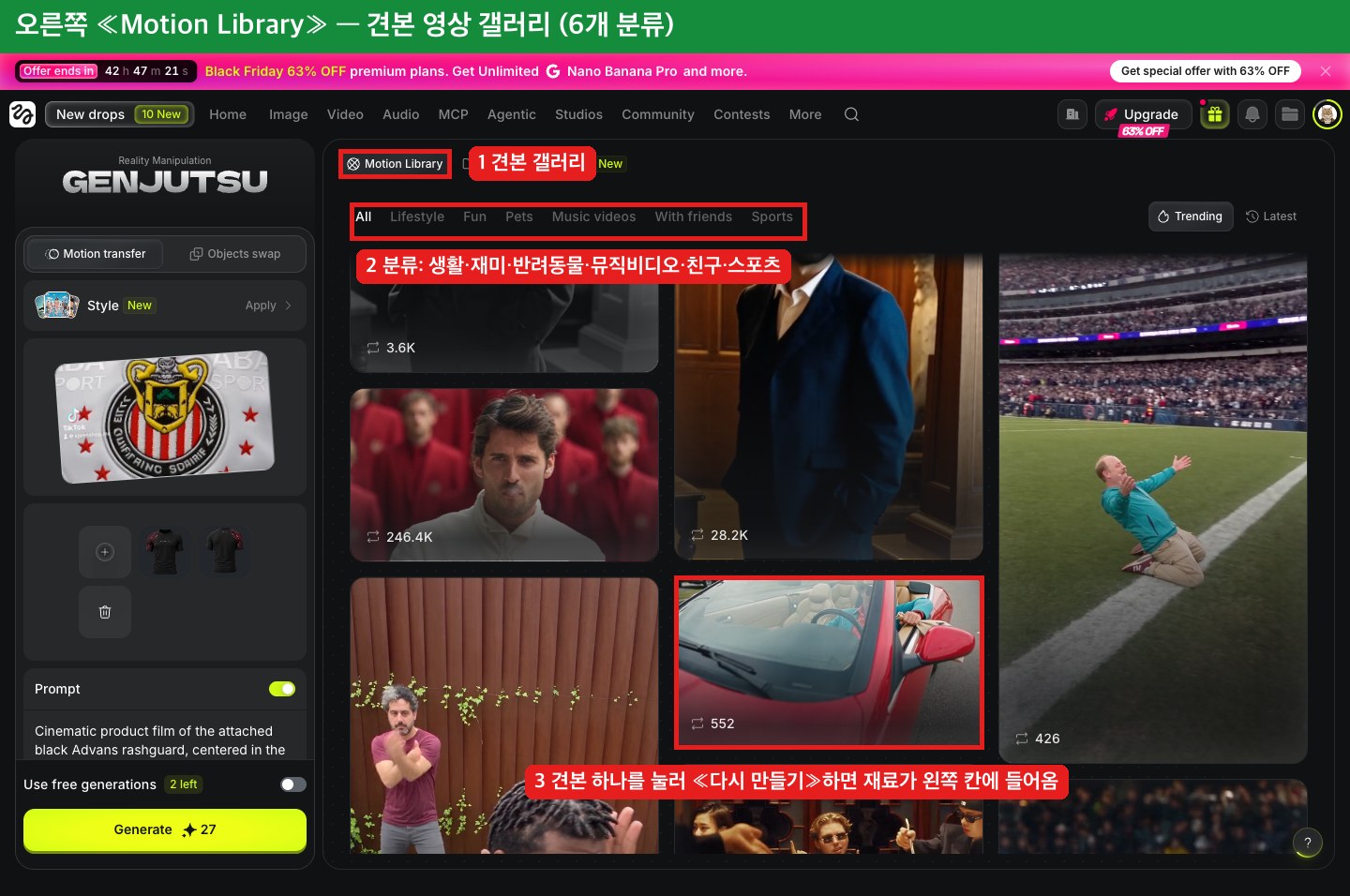
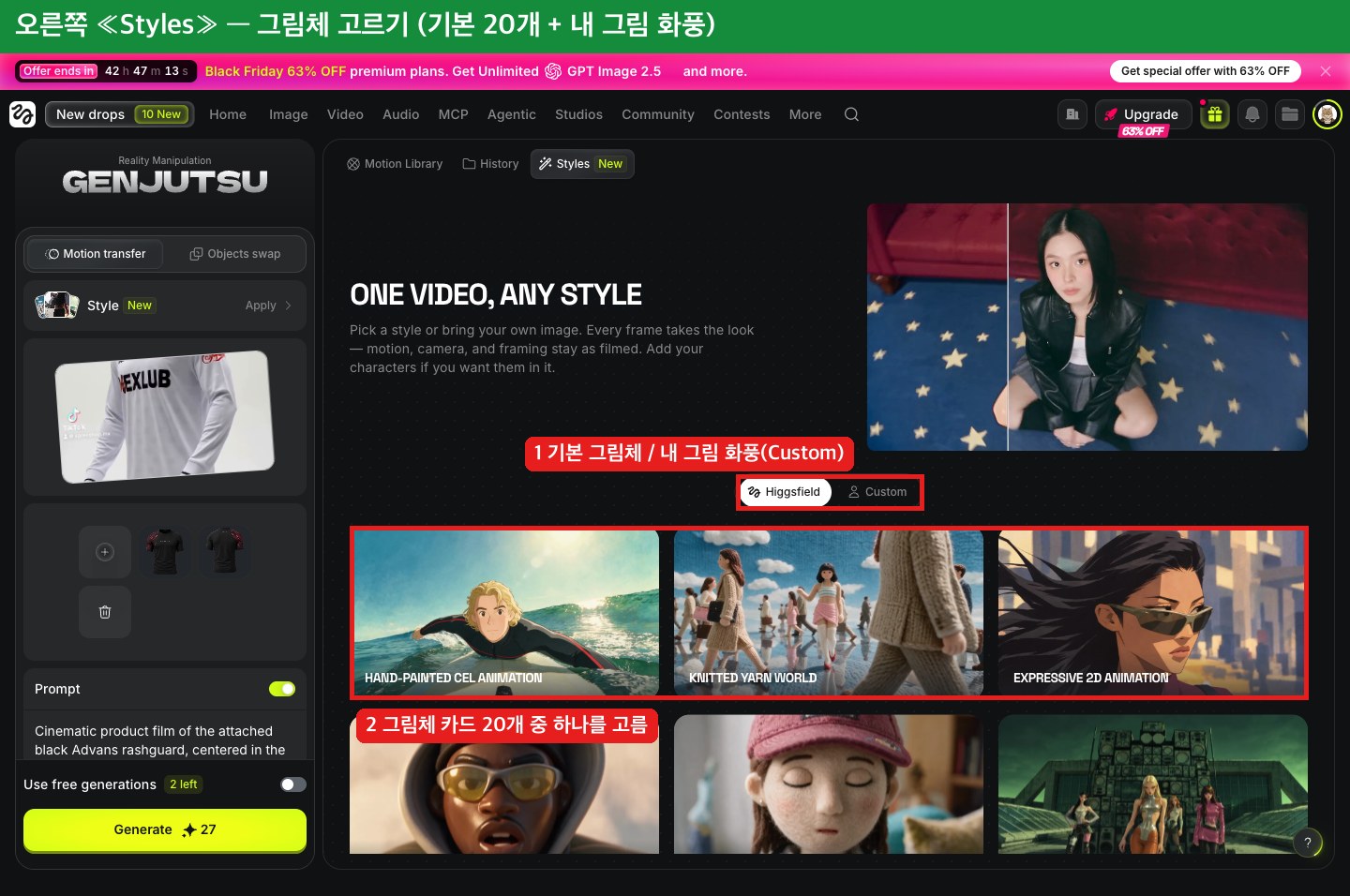
2. 누가 무엇을 하나 · 미리 준비할 것
| 단계 | 누가 | 동작 옮기기 | + 그림체 | 물건 바꾸기 |
|---|---|---|---|---|
| ① 재료 받기 | 사용자 | 영상 · 사진 · 한 줄 | + 그림체 고름 | 영상 · 그림 · 한 줄 |
| ② 영상 손질 | 우리 서버(ffmpeg) | AV1 이면 H.264 · 길이·비율 재기 | 같음 + 0초 장면 뽑기 | 같음 |
| ③ 지시문 | LLM | 장면 모음 8장 + 사진 + 한 줄 → 지시문 (시스템 지시문 A) | LLM 없음 · 고정 틀 TPL | 장면 모음 + 그림 + 한 줄 → 지시문 (시스템 지시문 B) |
| ④ 첫 장면 그림 | 그림 AI (크리젠 GPT 그림 편집) | — | 0초 장면 + 사진 + 그림체 견본 → 그 그림체로 다시 그림 (F0) | — |
| ⑤ 영상 | 크리젠 → Seedance 2.5 | task reference | task reference (첫 장면 그림을 @Image1) | task editing |
| ⑥ 마무리 | 우리 서버(ffmpeg) | 그대로 | 그림체별 1초 장면 수로 줄임(12/16/24) | 그대로 |
미리 준비해 둘 것(서비스 시작 전 한 번)
· 시스템 지시문 둘(동작 옮기기용 · 물건 바꾸기용) — 이 페이지에 전문 · 그대로 씀
· 그림체 영상 틀 TPL · 첫 장면 그림 틀 F0 — 이 페이지에 전문
· 그림체 목록(프리셋) — 그림체마다 이름 · 견본 그림 1~4장 · 화풍 설명 · 1초 장면 수. 만드는 법은 A++.
· 크리젠 계정 · 파일 올릴 저장소(공개 URL 이 나와야 함)
A. 동작 옮기기 (Motion transfer)
A-1. 넣는 것 → 나오는 것
춤·동작 영상 + 내 사진(사람·동물) + 한 줄 글 → 사진 속 주인공이 영상과 같은 동작·카메라로 움직이는 새 영상
배경도 원본을 따릅니다. 사진이 여러 장이면 @Image1, @Image2… 로 구분합니다(두 사람 영상 = 사진 두 장).
A-2. 힉스필드가 뒤에서 하는 일 (요청을 가로채 확인)
POST https://fnf-api-gw.higgsfield.ai/fnf/jobs/v2/hf_mult_motion_control
{"params":{"prompt":"<사용자 한 줄 그대로>","medias":[{"role":"image",...},{"role":"video",...}],
  "resolution":"480p","aspect_ratio":"auto","scene_mode":"off","batch_size":1}}
→ 서버 기록: Seedance 2.5 · reference · duration = 원본 초 반올림 · 가까운 화면비 · bitrate high · 소리 끔
→ 결과 장면 수 = 초 × 24 + 1 (공개 작업 41건 모두 이 규칙)
A-3. 우리 조립
# ③ 지시문: 원본에서 장면 8장(D-3) + 사진들 + 한 줄 → LLM(시스템 지시문 A) → prompt
inputs = {
  "prompt": prompt,
  "video_urls": [원본],                       # @Video1
  "image_urls": [사진1, 사진2, ...],           # @Image1, @Image2 ...
  "task": "reference",
  "duration": str(round(원본초)),              # "7" (문자열)
  "aspect_ratio": 가까운 비율(원본 w/h, ["21:9","16:9","4:3","1:1","3:4","9:16"]),
  "resolution": "480p", "generate_audio": False, "draft": False }
# ⑤ 크리젠 제출 (D-1) · gen_model "fal-ai/bytedance/seedance-2.5/reference-to-video" · gen_type "i2v"
왜 힉스필드는 한 줄 그대로 보내는데 우리는 LLM 으로 다시 쓰나: 같은 한 줄을 그대로 넣으면 컷이 많은 영상에서 우리 쪽이 원본 물건을 베끼거나 컷이 섞였습니다(카메라 견본 시험). «@Video1 을 컷마다 그대로 다시 찍어라» 꼴로 풀어 쓰자 힉스필드와 같아졌습니다. 힉스필드도 기록에 안 남는 틀 문장을 붙이는 것으로 봅니다.
시스템 지시문 A (동작 옮기기 · 전문)You rewrite a short user request for a REFERENCE video model (Seedance 2.5, task "reference": it makes a NEW video that copies the motion and camera of @Video1 and the identity of the reference images).
Inputs: the user's short request, a contact sheet of the source video with timestamps, and the user's reference images (@Image1, @Image2 ... in order).
Write ONE prompt (plain text, English, no markdown) in this structure:
1. One declaration line per image: "@ImageN — LABEL: <precise visual description: face, hair, body, clothes and colours for people; breed, coat and markings for animals>."
2. "Recreate @Video1 shot for shot. Keep every cut, shot order, camera angle, framing, lens, camera movement, lighting, setting, timing and every action exactly as in @Video1."
3. "SHOTS" — one line per shot you see in the contact sheet: "Shot K (<start-end s>): <camera and framing> — <what the subject does>."
4. "REPLACE the <source subject with distinguishing detail> with LABEL from @ImageN in every shot: same face, hair, body and clothes as @ImageN. Do not keep the original subject's face, hair or clothes." (one per subject; match subjects to images as the user asked)
5. "Identity lock: ..." keep each LABEL consistent in every shot, never duplicated, no extra people/animals.
6. "Do not reorder, skip, merge or add shots. Everything else — setting, background people, props, lighting and timing — stays as in @Video1."
Output only the prompt.LLM 출력 예 (춤 영상 + 분홍 단발 여자)
@Image1 — WOMAN: young woman with a pink bob haircut, straight blunt bangs and chin-length hair with darker roots, light skin, brown eyes, small silver hoop earrings, slim build; wearing an open bright yellow hooded raincoat that reaches mid-thigh, with silver snap buttons, a plain white crew-neck T-shirt, slim medium-blue jeans with rolled cuffs, and white low-top sneakers.
Recreate @Video1 shot for shot. Keep every cut, shot order, camera angle, framing, lens, camera movement, lighting, setting, timing and every action exactly as in @Video1.
SHOTS
Shot 1 (0-8 s): single continuous vertical medium shot from the front at chest height, handheld camera with slight sway and subtle push-in and drift, inside a dim abandoned industrial hall with red graffiti on concrete pillars, blurred background — the dancer performs a hip-hop / vogue-style hand routine facing camera: at 0.5 s she frames her face with both hands, one forearm horizontal under her chin and the other hand raised beside her head; at 1.5 s she lifts one arm above her head with the wrist bent and the other hand splayed in front of her chest, hips turned; at 2.5 s she pushes one hand toward the lens with the other hand at her chest; at 3.5 s she tilts her head with one hand at her jaw and the other arm extended to the side; at 4.5 s both hands come up beside her head, elbows wide, body swaying; at 5.5 s she reaches one arm forward toward the camera, torso twisting; at 6.5 s she drops into a bent-knee crouch, one hand crossing in front of her face and the other arm flung out wide; at 7.5 s she rises, both arms raised and spread wide with her hair swinging.
REPLACE the original dancer (long light-brown box braids, pink paisley bandana headband, oversized white long-sleeve shirt, colourful graffiti-print pink, blue and red pants, neon green nails) with WOMAN from @Image1 in every shot: same face, hair, body and clothes as @Image1. Do not keep the original subject's face, hair or clothes.
Identity lock: WOMAN keeps the pink blunt-banged bob, the open yellow hooded raincoat, white T-shirt, rolled blue jeans and white sneakers in every moment of the shot; she appears exactly once, never duplicated, and no extra people or animals appear.
Do not reorder, skip, merge or add shots. Everything else — setting, background people, props, lighting and timing — stays as in @Video1.
A-4. 결과 (왼쪽 원본 · 가운데 힉스필드 · 오른쪽 우리)
| 분야 | 사용자 한 줄 | 판정 | 본 것 |
|---|---|---|---|
| 재미 | make the man in my photo do this dance | 같음 | 빨간 곱슬 남자가 같은 춤 |
| 친구 | the two people in my photos doing this | 같음 | 두 사람 얼굴·옷 맞음 |
| 스포츠 | put the man from my photo on the skateboard doing this | 거의 같음 | 같은 사람·기술, 어안 테두리만 차이 |
| 뮤직비디오 | make the woman in my photo dance like this | 같음 | 분홍 단발 여자가 같은 춤 |
| 일상 | the man in my photo cooking like this | 같음 | 같은 남자가 팬케이크 |
| 반려동물 | make my dog do this | 같음 | 달마시안 원반 잡기 |
| 견본 «Product Macro Flow» | (견본 그대로) | 같음 | 480×854 · 217장면 양쪽 같음 |
카메라 앵글이 여러 번 바뀌는 견본 4편도 시험: 런웨이 · 추격 달리기 같음, 장비 몽타주 컷은 같고 얼굴은 원본 쪽, 전시장 자동차는 우리 쪽이 원본 차를 베낌(남은 차이 1편).
A+. 동작 옮기기 + 그림체
A+-1. 넣는 것 → 나오는 것
춤 영상 + 내 사진 + 그림체 1개 → 내가 그 그림체 캐릭터가 되어 같은 춤을 추고, 배경까지 그 그림체로 바뀐 영상
A+-2. «그림체»는 어디서 왔나 — 힉스필드 공개 목록에서 받음
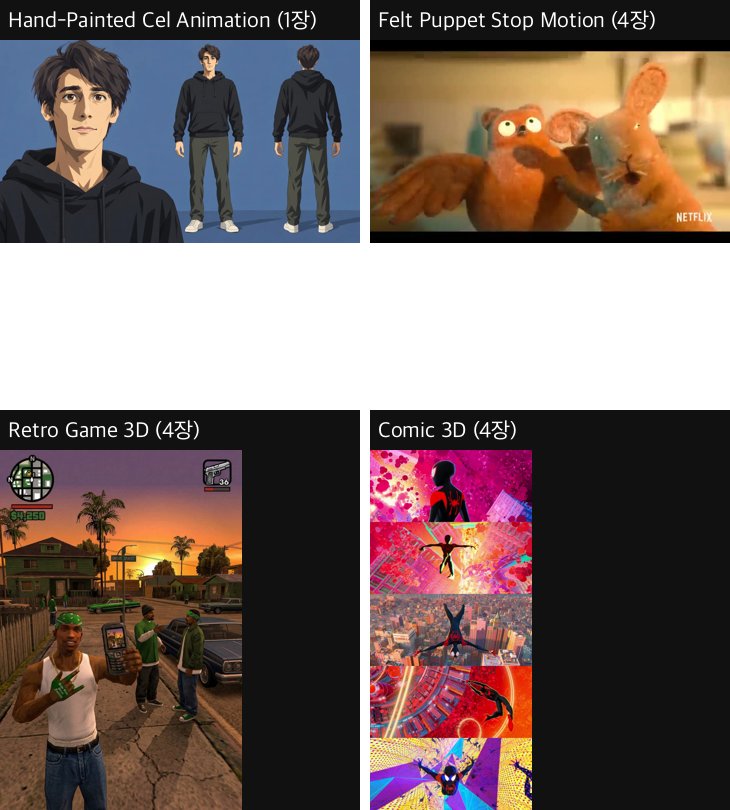
그림체 카드 20개의 정보는 로그인 없이 열리는 목록
우리가 잡은 것: 이름 · 견본 그림 · 1초 장면 수(결과 영상을 재서 얻음) · 요청 꼴. 못 잡은 것: 서버 안의 화풍 글 · 첫 장면을 그리는 그림 AI 와 지시문.
GET https://fnf-api-gw.higgsfield.ai/fnf-cms-api/restyle-presets?lang=en 에 있습니다. 그림체 하나에 이름 · 견본 그림 1~4장(images) · 견본 영상(원본/결과)이 있고, 화풍 설명(description)은 비어 있습니다(null). 사용자가 만들기를 누르면 화면은 preset_id 하나만 보냅니다. 즉 «이 그림체를 이렇게 그려라»라는 글은 힉스필드 서버 안에만 있고 밖으로 나오지 않습니다.우리가 잡은 것: 이름 · 견본 그림 · 1초 장면 수(결과 영상을 재서 얻음) · 요청 꼴. 못 잡은 것: 서버 안의 화풍 글 · 첫 장면을 그리는 그림 AI 와 지시문.
A+-3. 힉스필드가 뒤에서 하는 일 — 두 단계
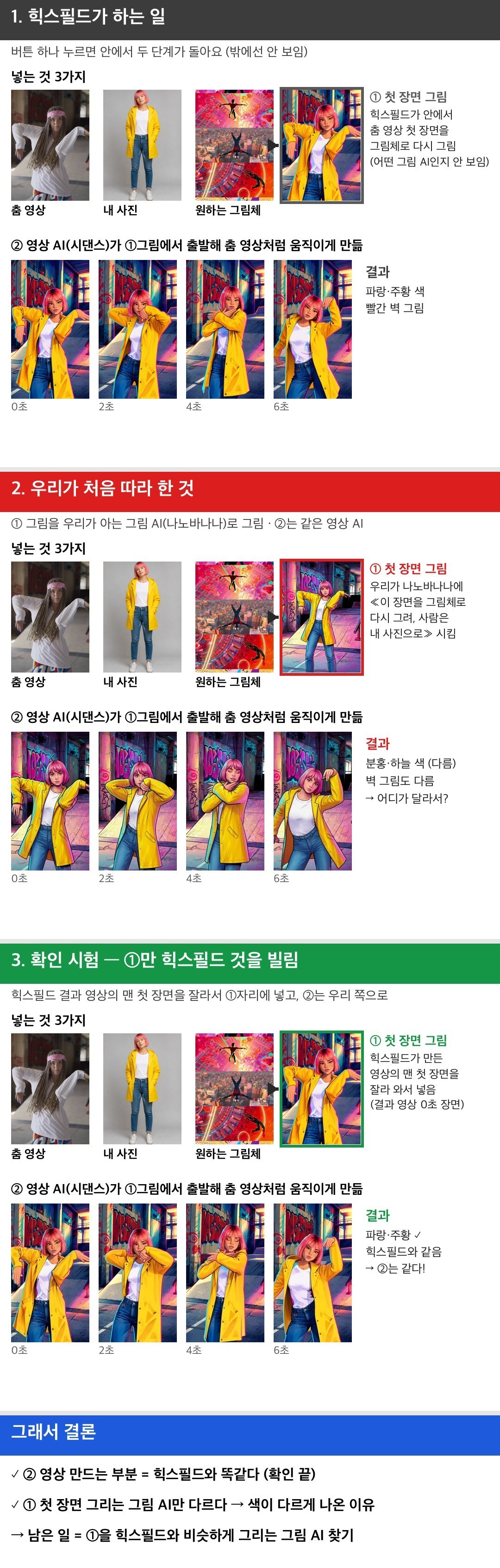
POST …/fnf/jobs/v2/restyle   {"params":{"preset_id":"<그림체 id>","prompt":"make the woman in my photo dance like this",
  "medias":[video, image],"resolution":"480p"}}
→ 서버 기록: 동작 옮기기와 같은 값(reference · 반올림 · bitrate high · 소리 끔)
→ 결과: 그림체별 1초 장면 수로 줄어 있음(12/16/24) · 첫 장면이 이미 그림체로 그려져 있음
이걸 어떻게 알았나: 그림체 견본 그림만 참고로 넣으면 우리 결과는 얼굴·배경이 실사로 남았습니다. 힉스필드 결과의 첫 장면을 뽑아 우리 요청의 @Image1 로 넣자 색·벽 그림·동작까지 힉스필드와 같아졌습니다(그림체 17개 모두). 그리고 힉스필드에서 같은 요청을 두 번 만들면 두 번 다 같은 색이 나와, 차이가 우연이 아니라 «첫 장면 그림»에서 온다는 것이 확정됐습니다.
A+-4. «나노바나나로 그렸다»는 무슨 뜻인가
①단계(첫 장면 그림)를 힉스필드가 어떤 그림 AI 로 그리는지 모르니, 우리가 대신 그릴 그림 AI 를 고르는 시험을 했습니다. 넣는 것은 «원본 0초 장면 + 내 사진 + 그림체 견본 그림», 시키는 것은 «이 장면을 구도 그대로, 사람은 내 사진으로, 전부 이 그림체로 다시 그려라»(F0)입니다. 나노바나나 프로 · 나노바나나 2 · GPT 그림 편집 · Seedream 4 · 4.5 · Flux 를 같은 조건으로 비교했고 가장 가까운 것은 GPT 그림 편집(openai/gpt-image-2/edit)이었습니다. 나노바나나는 후보였을 뿐 최종 선택이 아닙니다.
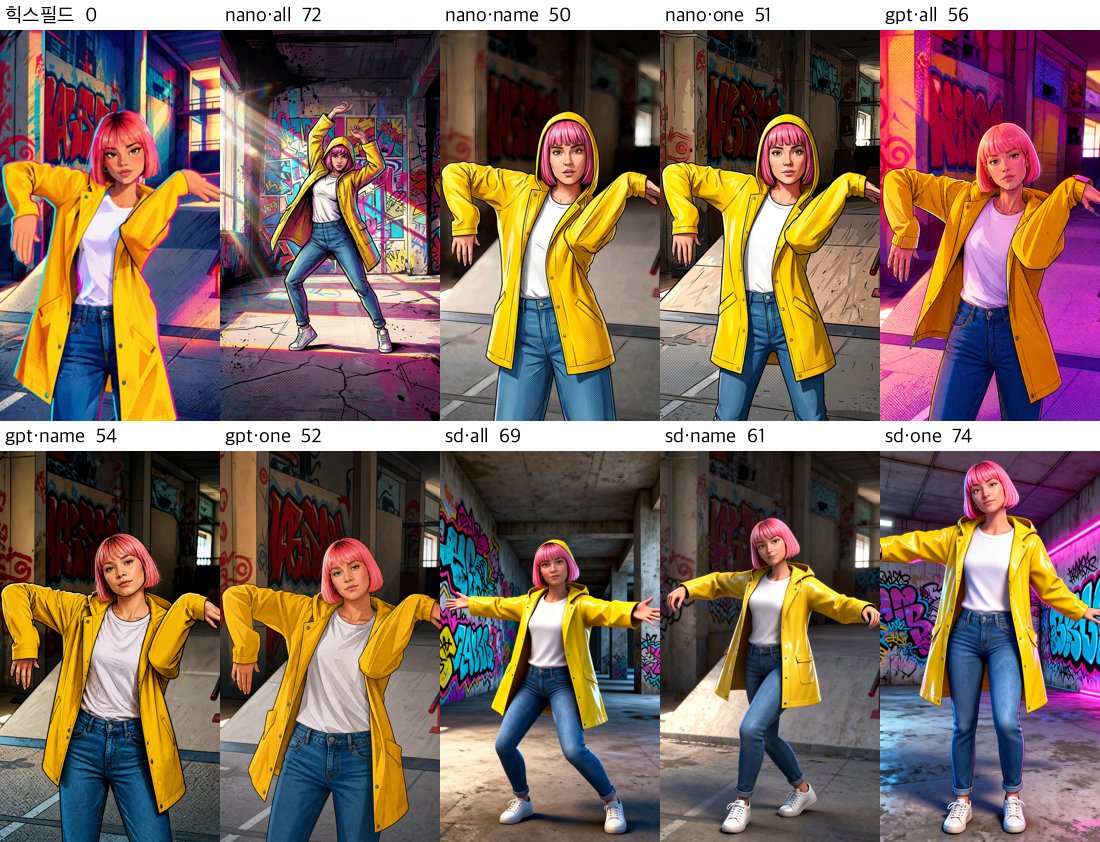
A+-5. 우리 조립
# ④ 첫 장면 그림 — 크리젠 gen_type "i2i", gen_model "openai/gpt-image-2/edit"
first = ffmpeg 로 원본 0초 장면
inputs = {"prompt": F0.format(name=그림체이름, desc=화풍설명),
          "image_urls": [first, 내사진, *그림체견본그림],
          "image_size": {"width":1024,"height":1792}}          # 원본 비율 맞춤(세로 9:16 예)
# ⑤ 영상 — 지시문은 짧은 틀(긴 지시문은 배경을 실사로 되돌림)
inputs = {"prompt": TPL.format(name=그림체이름, refs="@Image2, @Image3, ..."),
  "video_urls": [원본], "image_urls": [첫장면그림, *그림체견본그림],
  "task":"reference", "duration":str(round(원본초)), "aspect_ratio":가까운비율,
  "resolution":"480p", "generate_audio":False, "draft":False}
# ⑥ 1초 장면 수로 줄임
ffmpeg -i out.mp4 -vf fps=<12|16> -c:v libx264 -crf 16 final.mp4 # 24 는 그대로Image 1 is a video frame. Redraw this exact frame — same place, same camera angle, same framing and composition — fully in the visual style of the images after Image 2 ({name}), everything including the background. Replace the dancer with the woman from Image 2 (pink bob with bangs, yellow hooded raincoat, white T-shirt, blue jeans) in the same pose, drawn in that style.@Image1 is the first frame of the result. Start exactly from @Image1 and keep every frame drawn exactly like it — {name}, the style of {refs}, for the woman and the whole background. The woman in @Image1 dances exactly like the dancer in @Video1: same moves, timing, framing and camera movement as @Video1.| 1초 장면 | 그림체 |
|---|---|
| 12장 | Cel-Shaded CG Anime, Expressive Gouache Fashion, Felt Puppet Stop Motion, Graphic Cel, Grotesque Street CGI, Outline-free Cel, Painterly Cinematic 3D, Painterly Sculpted Animation, Sculptural 3D Fashion, Textured Gouache Character Illustration, Warm Painterly 3D Animation |
| 16장 | Comic 3D, Expressive 2D Animation, Neon Graphic Cinematic 3D, Nighttime Anime Pixel Art |
| 24장 | Chunky Textured Low-Poly, Retro Game 3D |
| 24 → 50장 | 내 그림 화풍(Custom) — 24장으로 만든 뒤 같은 장면을 늘려 50장/초로 보냄 |
A+-6. 결과 — 그림체 20개 다 되나
영상 단계는 20개 모두 됩니다. 셀 애니 · 뜨개 · 장난감 CG 3개는 사용자 업로드 시험에서, 나머지 17개는 같은 춤 영상(5초)으로 시험했습니다. 첫 장면을 힉스필드 것으로 넣으면 17개 중 16개 같음 · 1개 거의 같음(구아슈: 끝 1초 카메라가 다가감). Retro Game 3D 는 한 번 크리젠 내용 검사에 걸렸다가 다시 넣어 통과했습니다(게임 장면 견본 탓으로 봄).
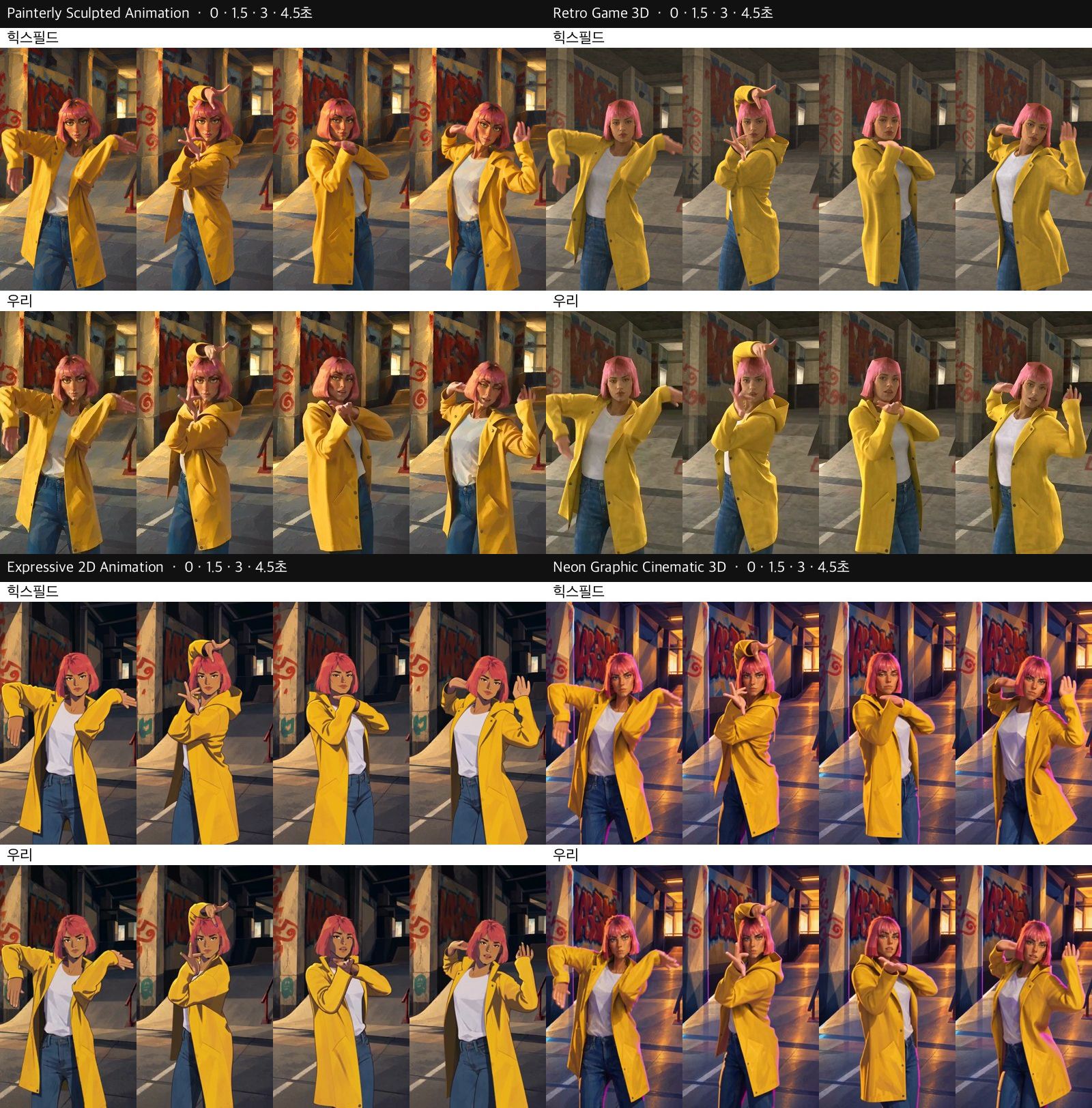
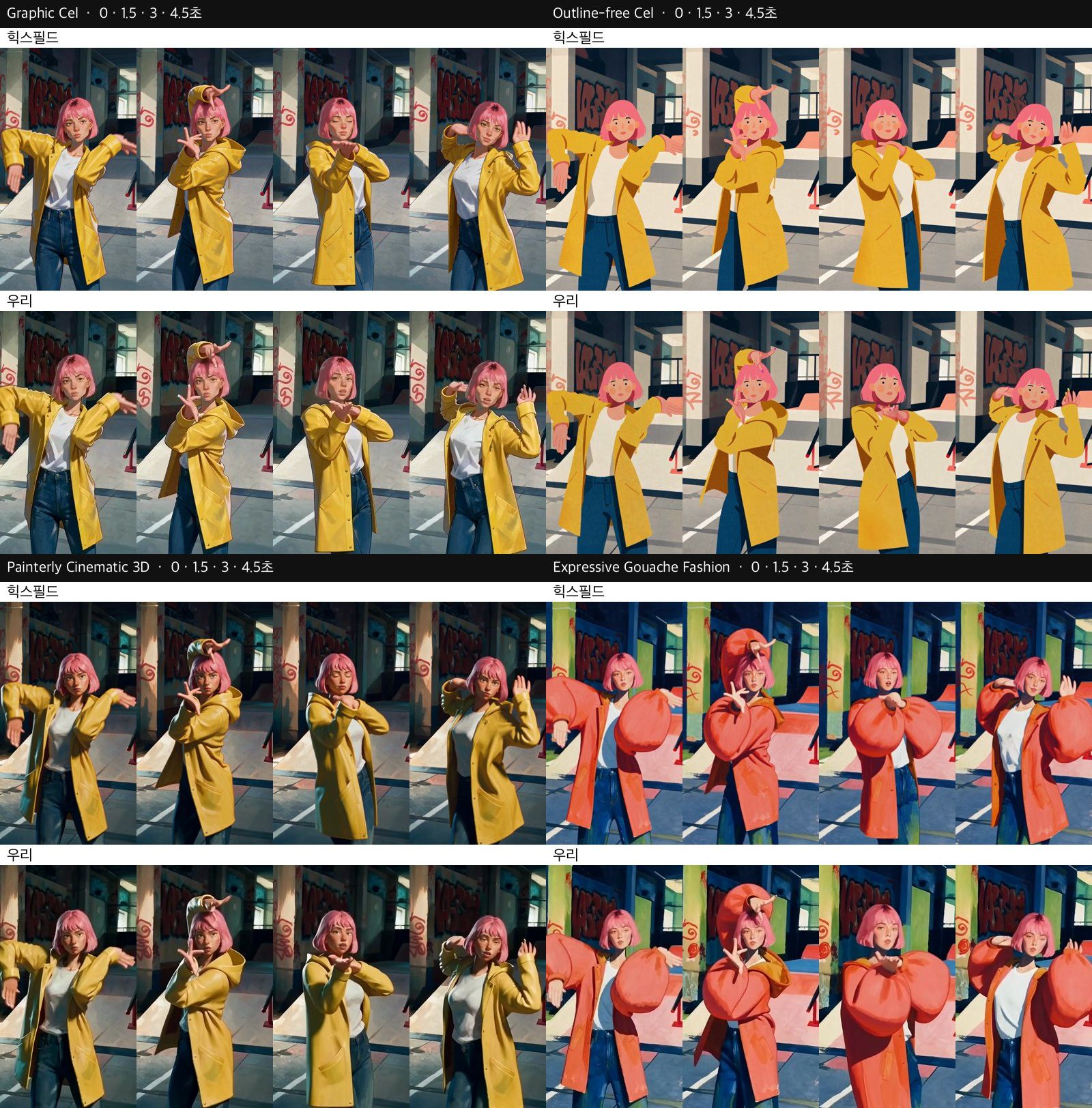
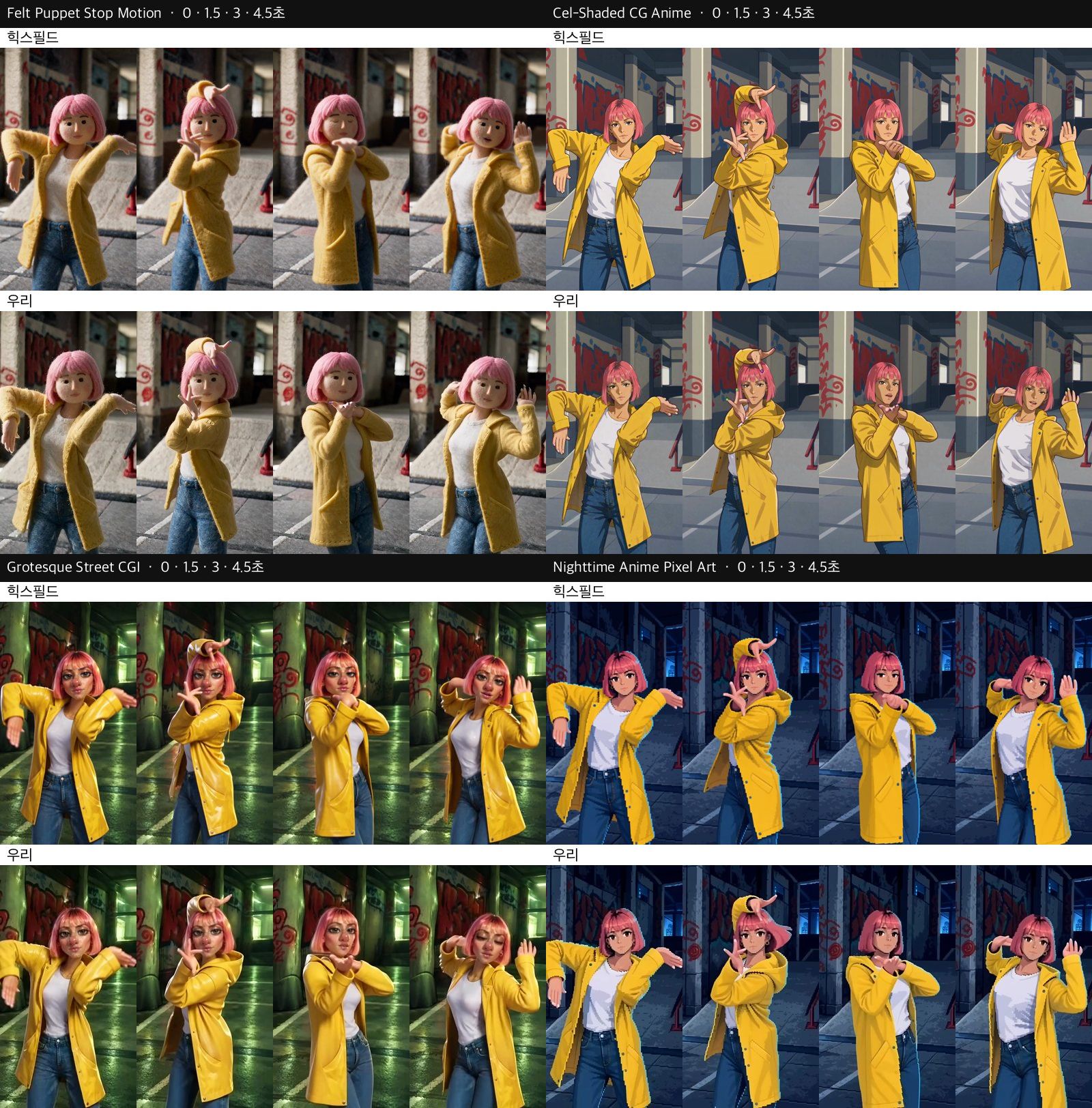
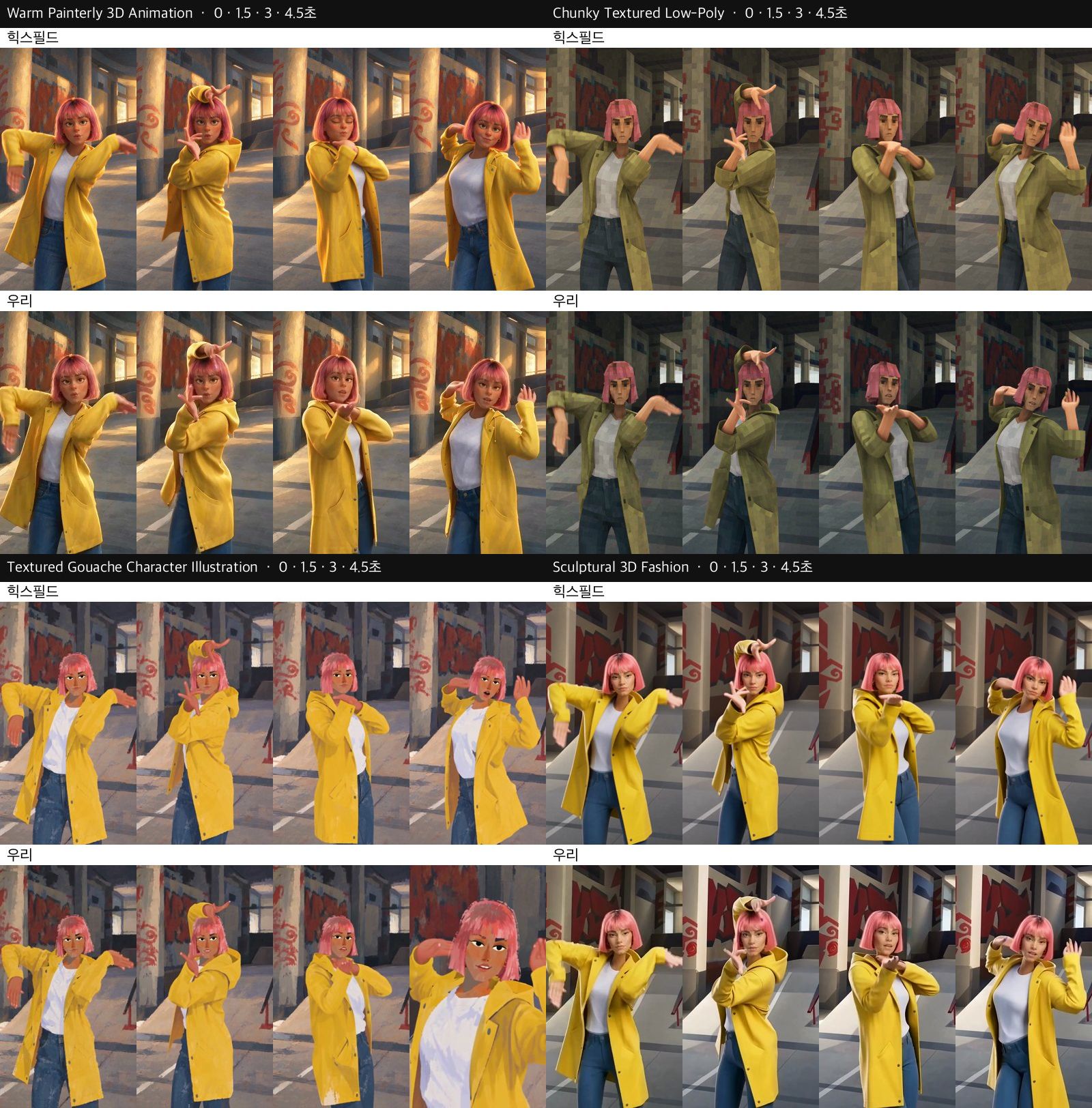
그림체별 나란히 영상 16편
우리 힘만으로(첫 장면도 우리가 그림) — 5편
펠트 인형 · 밤 픽셀아트는 비슷합니다. 만화풍(색) · 구아슈 패션(옷) · 내 그림 화풍(배경)은 힉스필드보다 덜 과감합니다. 옷 묘사를 지시문에서 빼면 원본 옷을 따라가 오히려 멀어졌습니다.
첫 장면 그림을 힉스필드 수준으로 올리는 법(개발 과제): ① 그림체마다 «첫 장면 그림 지시문»을 따로 다듬어 프리셋에 저장(그림체별 화풍 설명을 F0 에 붙임) ② 첫 장면을 2~4장 뽑아 LLM 이 «그림체가 배경까지 과감하게 바뀌었나»를 골라 영상으로 넘김(그림 한 장 약 20원이라 싸다) ③ 그래도 약한 그림체는 견본 그림을 더 넣음. 영상 단계는 바꿀 것이 없습니다.
A++. 그림체(프리셋) 만드는 법 · 내 그림 화풍 · 명화·디즈니 풍
| 프리셋 한 개에 들어갈 것 | 어디서 | 쓰는 곳 |
|---|---|---|
| 이름 (예: Felt Puppet Stop Motion) | 우리가 정함 | TPL·F0 의 {name} |
| 견본 그림 1~4장 | 우리가 직접 만든 그림. 힉스필드 견본은 영화·게임 장면이라 서비스에 쓰면 저작권 문제 | 첫 장면 그림 입력 · 영상 입력 @Image2… |
| 화풍 설명 한 문단 | 견본 그림을 LLM 에 보여 주고 아래 지시문으로 씀(힉스필드 Custom 과 같은 방식) | F0 에 붙임 |
| 1초 장면 수 12/16/24 | 우리가 정함(셀·손그림 12, 3D 16~24) | 마무리 ffmpeg |
내 그림 화풍 (Custom) — 힉스필드 방식
사용자가 그림 1~8장을 올리면 힉스필드 서버가 그림을 보고 이름과 긴 화풍 설명을 스스로 씁니다(
POST /fnf/restyle/presets/custom {media_input_ids} → 목록에 name·description 이 생김). 그 뒤는 일반 그림체와 같습니다. 우리 동화 3D 그림 3장(벽돌집 · 돼지 · 늑대)으로 시험: 힉스필드는 «Whimsical 3D Cartoon Render»라고 썼고, 우리 LLM 은 «Glossy Storybook 3D Cartoon»이라고 썼습니다(아래). 결과 영상은 24장/초로 만든 뒤 50장/초로 늘려 보냅니다.힉스필드 서버가 쓴 설명 · 우리 LLM 이 쓴 설명 · 우리가 쓴 시스템 지시문
힉스필드A cheerful, family-friendly 3D animated illustration style with rounded geometry, soft proportions, and highly simplified shapes. Subjects are modeled with smooth, plush-looking surfaces and gentle contours, avoiding sharp edges or excessive anatomical realism. Faces and features are large and expressive, with oversized eyes, small noses, compact mouths, and clear, readable poses designed for character appeal. Materials resemble clean digital plastic, soft fabric, painted wood, brick, fur, and foliage, each rendered with subtle texture rather than heavy detail. Surfaces have a polished but non-glossy finish, with visible depth through soft ambient occlusion and mild edge highlights. Lighting is bright, even, and studio-clean or sunny and idyllic, with soft shadows and warm-to-neutral tonal transitions. Colors are saturated, vivid, and friendly, often using pastel or candy-like hues paired with rich greens, blues, reds, and pinks. Environments are lush and idealized, with tidy stylized grass, rounded trees, fluffy clouds, and decorative details that feel charming and handcrafted. Overall shading is smooth and softly blended, with mild gradients, crisp silhouettes, and a playful, polished cartoon-rendered look.NAME: Glossy Storybook 3D Cartoon
DESC: Polished, family-feature-style 3D CGI rendering with soft, rounded, slightly chunky geometry and exaggerated, toy-like proportions; every edge is bevelled and nothing is sharp or realistic. Surfaces read as clean, matte-to-satin materials with subtle stylized texture — fine fuzzy fur and peach-fuzz skin, visibly woven soft fabric with stitched seams, chunky hand-laid bricks and wood grain, clumped painterly leaves — detailed but simplified, with no grit or wear. Lighting is bright, warm daytime sun with a gentle key from above-front, soft wraparound fill, warm bounce light and soft subsurface glow on skin, mild rim highlights, and soft, short contact shadows with no harsh contrast. The palette is saturated and cheerful but harmonious: clear sky blues, lush yellow-greens, warm terracotta and earthy browns, candy pinks, purples and yellows, plus neutral greys kept soft rather than cold. Shading is smooth with gentle gradients, rosy ambient occlusion and a slight painterly softness. Environments are lush, idealized storybook countrysides — rounded cloud-like tree canopies, fluffy cumulus clouds, flower-dotted meadows, winding dirt paths — with atmospheric haze that lightens and desaturates the distance.You are given 1-8 reference images that share one visual style. Write a reusable style preset.
Output exactly two lines:
NAME: <2-5 word style name>
DESC: <one paragraph, 120-200 words>
DESC describes only the rendering style, never the subjects or story: geometry and proportions, surface materials and texture, lighting, colour palette, shading and edges, environment treatment, overall finish. Write it so it can be applied to any person or place. No names of artists, studios, films or brands.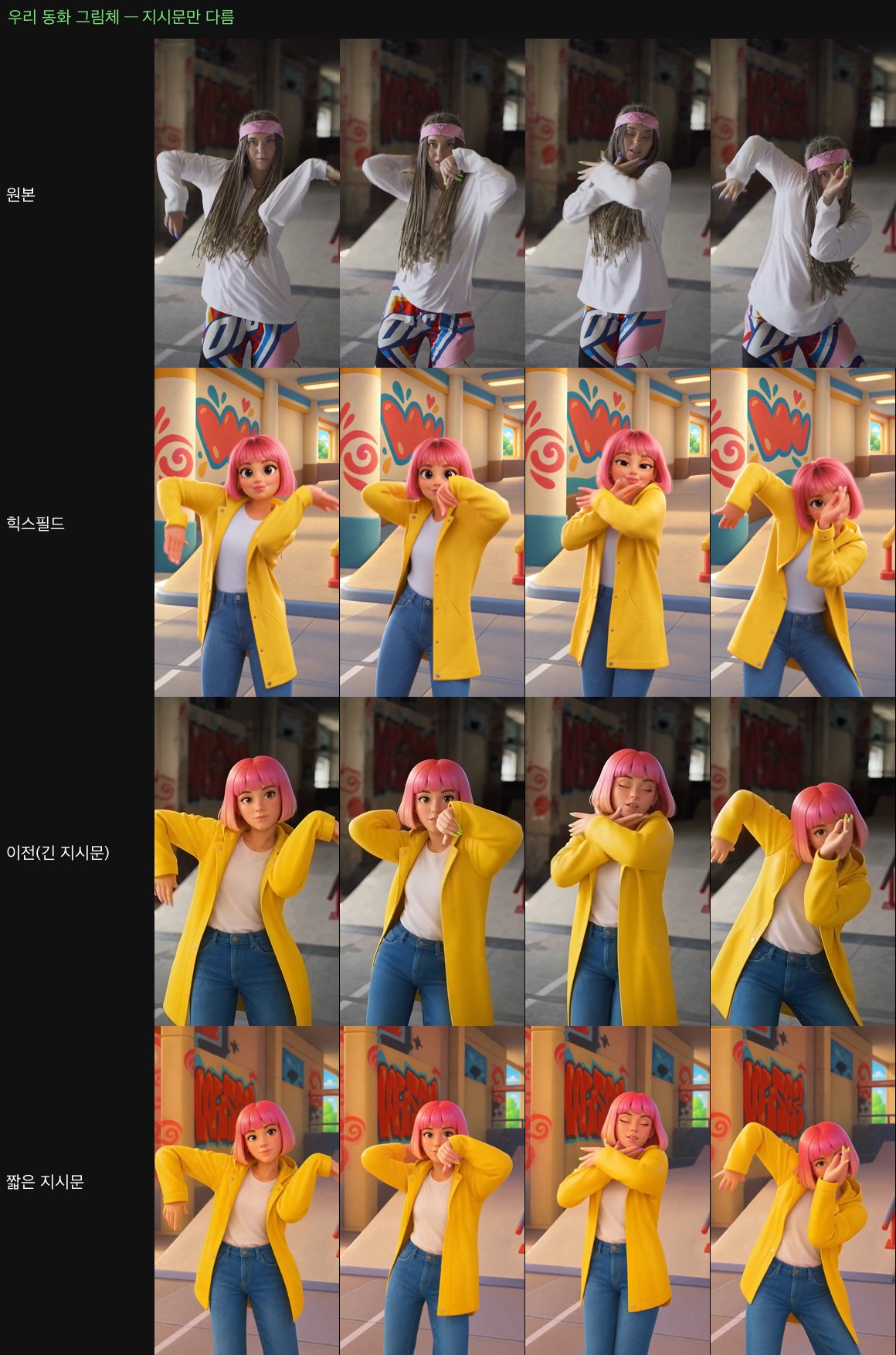
명화·디즈니 풍을 올리면?
구조상 «내 그림 화풍»에 그 그림을 올리는 것과 같습니다. 우리가 확인한 것은 우리가 만든 3D 그림뿐이고, 명화·특정 스튜디오 그림은 시험하지 않았습니다(미검증). 특정 영화·캐릭터 그림은 크리젠 내용 검사에 걸릴 수 있고(실존 인물 견본이 실제로 거절됨) 저작권 문제가 있어, 서비스에선 «화풍 설명에 작가·작품 이름을 쓰지 않는다» 규칙(위 지시문에 들어 있음)을 둡니다. 저작권이 끝난 명화(반 고흐 등)는 문제없을 것으로 보나 결과 품질은 미검증입니다.
B. 물건 바꾸기 (Objects swap)
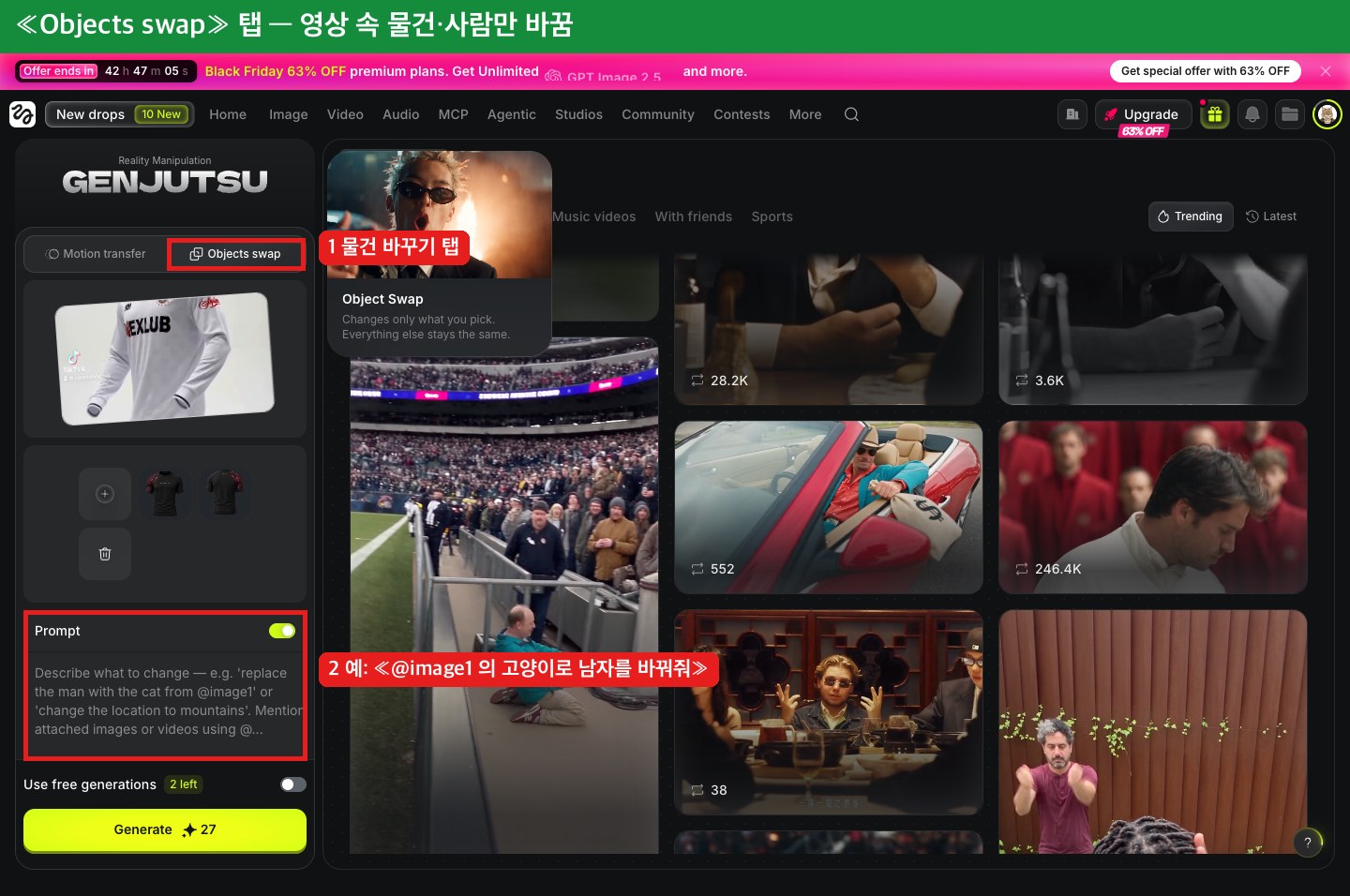
B-1. 넣는 것 → 나오는 것
영상 + 바꿀 것의 그림(물건·사람·동물) + 한 줄 «무엇을 @Image1 으로 바꿔» → 그것만 바뀌고 나머지(사람·배경·카메라)는 원본 그대로인 영상
동작 옮기기와 달리 원본 영상을 «고치는» 방식이라 길이·움직임이 원본에 딱 붙습니다.
B-2. 힉스필드가 뒤에서 하는 일
POST …/fnf/jobs/v2/hf_mult_replace_object   (사용자 한 줄 + video + image)
→ 서버가 한 줄을 긴 지시문으로 다시 씀(작업 기록의 enhanced_prompt 로 확인)
→ Seedance 2.5 · editing · duration "auto" · aspect "auto" · 소리 끔
→ 결과 장면 수 = 원본 장면 수 이하의 가장 큰 8의 배수 + 1 (공개 작업 23건 중 22건)TASK - VIDEO EDIT:
0-7.5s: Replace only the classical acoustic guitar in @Video1 with the brown violin and bow from @Image1. Keep every unrequested element, camera motion, lighting treatment, and overall color grading from @Video1 exactly the same.사람·동물일 때(긴 꼴) 예
@Image1 — WOMAN, the replacement WOMAN: young East Asian woman with light skin, a slim seated silhouette, long straight black hair parted near center, dark eyes, and a soft smile. Wardrobe: cream short-sleeve knit top under a blue-gray plaid pinafore dress.
@Image2 — CAT, the replacement CAT: slender white-and-gray domestic shorthair with gray tabby markings over the head and back, golden eyes, pink nose, upright ears, and a red collar with a bell.
Video edit. Keep this @Video1 clip exactly as it is — the same single continuous restaurant-booth shot, the same camera moves, framing and composition, the same warm wood-paneled booth, mirrors, sconces, glossy table, white plate of cheesecake, forks, lighting, pacing and timing. Change only the man in the black crewneck shirt and the animated grey and white cat, keeping original blocking, poses, target motion, positions, screen placement and timing while rendering each replacement's complete image-defined appearance and stature.
1. REPLACE the original man in the black crewneck shirt (0-10.2s, seated center-right) with WOMAN from @Image1. Put WOMAN into the shot, matched beat-for-beat to the original cutting cheesecake, bringing the loaded fork toward the cat, eating it, and glancing between the plate and camera. Render WOMAN's full declared appearance — light skin, slim silhouette, long center-parted straight black hair, dark eyes, soft smile, cream knit top, and blue-gray plaid pinafore dress. Keep her face, hair, and wardrobe consistent throughout; preserve her right-hand fork contact, the cheesecake interaction, and her reflection on the glossy table.
2. REPLACE the original animated grey and white cat (0-10.2s, screen-left) with CAT from @Image2. Put CAT into the shot, matched beat-for-beat to the original wide-mouth screaming loop, contented blink when food passes, drop down, and re-emergence, adapted naturally to the CAT's body. Render CAT's white-and-gray tabby coat, golden eyes, pink nose, upright ears, and red bell collar consistently; preserve its small fork prop, table-edge contact, and table reflection.
Identity lock: WOMAN belongs only to the man in the black crewneck shirt from 0-10.2s and is never duplicated onto another figure. Within 0-10.2s, replace the original source person identified as the man in the black crewneck shirt in @Video1 completely with WOMAN in every appearance; the original identity must not appear within those windows. Retain the original performance, pose, blocking, interactions, and timing. Outside those windows, preserve that source person's original appearance, subject only to other explicitly requested edits. Lock WOMAN's complete image-defined identity and effective wardrobe only within this window. CAT belongs only to the animated grey and white cat from 0-10.2s; lock its declared coat, facial features, collar, bell, reflections, and contact prop across the shot. Reflections and shadows follow the replacements only while active.
Everything else — the restaur
B-3. 우리 조립
# ③ 지시문: 장면 모음 8장 + 그림들 + 한 줄 → LLM(시스템 지시문 B) → prompt  (힉스필드 서버가 하는 일을 우리가 함)
inputs = {"prompt": prompt, "video_urls":[원본], "image_urls":[그림1, ...],
  "task":"editing", "duration":"auto", "aspect_ratio":"auto",
  "resolution":"480p", "generate_audio":False, "draft":False}
# ⑤ 크리젠 제출 · 같은 모델 이름You rewrite a short user request for a VIDEO EDIT model (Seedance 2.5, task "editing": the output keeps @Video1 and changes only what is requested).
Inputs: the user's short request (images are <<<image_N>>> = @ImageN), a timestamped contact sheet of the source video, and the user's reference images.
Choose the format by WHAT is being replaced:
FORMAT A — the replaced thing is an OBJECT or PROP (ball, cup, phone, instrument, bag, toy, food, vehicle part …). Output exactly:
TASK - VIDEO EDIT:
<start>-<end>s: Replace only the <source object as a 2-5 word noun phrase> in @Video1 with the <image as a 2-6 word noun phrase> from @ImageN.
The object phrases are SHORT NAMES, not descriptions (good: "the red umbrella", "the silver laptop", "the striped beach ball", "the green glass bottle"). Never mention people, animals, hands, poses or actions in FORMAT A (no "held in her left hand", no "which the boy kicks") — naming the holder or the pose makes the model keep the old pose or change the holder. Keep every unrequested element, camera motion, lighting treatment, and overall color grading from @Video1 exactly the same.
Use ONE window that starts at 0 even if the object is briefly hidden or off-screen. Only if the object is gone for the final part of the clip, add one extra last line "<start>-<end>s: keep everything exactly the same". Never split the replacement into several windows.
The window starts at 0 and ends about 0.3-1.0 s before the clip end, rounded to 0.1 s (e.g. an 8 s clip → 0-7.5s), unless the object clearly leaves earlier.
FORMAT B — the replaced thing is a PERSON, CHARACTER or ANIMAL. Output exactly these blocks:
@ImageN — LABEL, the replacement LABEL: <skin, stature, silhouette, hair, face>. Wardrobe: <clothes, colours, shoes, accessories>. (animals: coat, colour, markings, breed instead of wardrobe)
Video edit. Keep this @Video1 clip exactly as it is — the same <single continuous shot / shots>, the same <camera movement>, <framing>, the same <setting>, the same <key props and interactions>, the same <lighting>, pacing and timing of every beat. Change only the <source subject with distinguishing clothing>, keeping original blocking, poses, target motion, positions, screen placement and timing while rendering the replacement person's complete image-defined appearance and stature.
1. REPLACE the original <source subject> (<start>-<end>s, <where in frame>) with LABEL from @ImageN. Put LABEL into the <entire> shot, matched beat-for-beat to the original <list of actions in order>. Render LABEL's full declared appearance — <list>. Keep <face, hair, signature clothing> consistent with LABEL's declaration throughout.
Identity lock: LABEL belongs only to the <source subject> for <window> and is never duplicated onto another figure. Within <window>, replace the original source person identified as the <source subject> in @Video1 completely with LABEL in every appearance; the original identity must not appear within those windows. Retain the original performance, pose, blocking, interactions, and timing. Outside those windows, preserve that source person's original appearance, subject only to other explicitly requested edits. Lock LABEL's complete image-defined identity and effective wardrobe across the shot; preserve <contacts with props>.
Everything else — <setting, props, other people, lighting>, the camera moves and all timing — stays exactly the same.
(For FORMAT B the window is 0.0 to about 0.2-0.3 s before the clip end.)
Use what you actually see in the contact sheet and images. Output only the prompt, nothing else.지시문 규칙에서 배운 것: 바꿀 물건 이름을 «무릎에 얹은 나무 기타»처럼 사람·자세까지 쓰면 엉뚱한 것이 바뀝니다(고양이 장난감 대신 고양이가 토끼가 됨). 이름은 2~5단어만 → 고친 뒤 같아졌습니다. 같은 지시문도 4번 중 1번은 안 바뀔 수 있어(바이올린) 서비스에선 «바뀌었나» 자동 검사 후 1회 다시 만들기를 둡니다.
B-4. 결과 (왼쪽 원본 · 가운데 힉스필드 · 오른쪽 우리)
| 분야 | 사용자 한 줄 | 판정 | 본 것 |
|---|---|---|---|
| 재미 | replace the juggling clubs with the lemons from <<<image_1>>> | 같음 | 곤봉이 레몬으로 |
| 재미 | replace the dancing person with the woman from <<<image_1>>> | 같음 | 춤추는 사람이 분홍 단발 여자로 |
| 친구 | replace the drinks they are holding with the soda can from <<<image_1>>> | 같음 | 잔이 탄산 캔으로 |
| 친구 | replace the phone with the retro camera from <<<image_1>>> | 같음 | 휴대폰이 필름 카메라로 |
| 스포츠 | replace the basketball with the watermelon from <<<image_1>>> | 같음 | 농구공이 수박으로 |
| 스포츠 | replace the tennis racket with the frying pan from <<<image_1>>> | 같음 | 테니스 라켓이 프라이팬으로 |
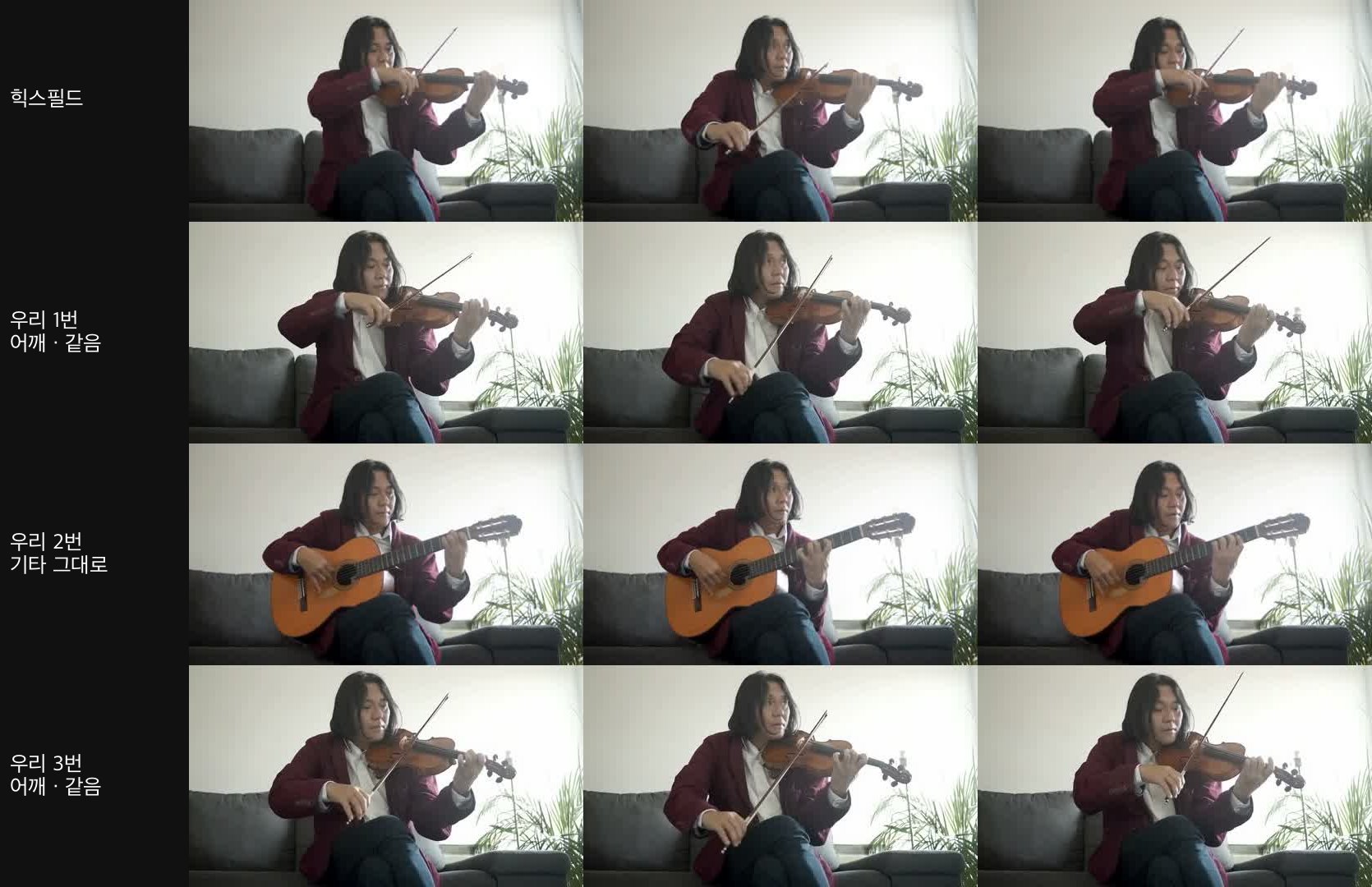
| 뮤직비디오 | replace the guitar with the violin from <<<image_1>>> | 무작위 | 같은 지시문 4번 중 2번 같음 · 1번 안 바뀜 |
| 뮤직비디오 | replace the singer with the woman from <<<image_1>>> | 같음 | 가수가 분홍 단발 여자로 |
| 일상 | replace the cup with the orange mug from <<<image_1>>> | 같음 | 컵이 주황 머그로 |
| 일상 | replace her shopping bags with the purple backpack from <<<image_1>>> | 같음 | 쇼핑백이 보라 배낭으로 |
| 반려동물 | replace the dog with the cat from <<<image_1>>> | 거의 같음 | 개가 주황 고양이로, 끝 카메라만 다름 |
| 반려동물 | replace the toy with the blue plush bunny from <<<image_1>>> | 같음(고친 뒤) | 지시문 규칙 고친 뒤 장난감만 토끼로 |
| 견본 «Cheesecake Diner Duo» | (견본 그대로) | 같음 | 480×854 · 249장면 양쪽 같음 |
C. 숨은 «배경 지정» 모드
화면엔 없고 요청 값
scene_mode(off · character · video · location)로만 바뀝니다. location 은 배경 그림을 {"role":"location"} 으로 함께 보냅니다. 우리는 동작 옮기기에 배경 그림을 마지막 @ImageN 으로 넣고 지시문에 «in the place shown in @ImageN» 한 줄을 더해 같은 결과를 냈습니다. 서비스에 꼭 필요하진 않습니다.D. 공통 개발 규격
D-1. 크리젠 호출
POST {API}/v4/media/creagen/submissions
{"submissions":[{"submission_key":"<입력 JSON 의 sha1>","gen_type":"i2v",          # 그림은 "i2i"
  "model_input":{"gen_model":"fal-ai/bytedance/seedance-2.5/reference-to-video","gen_count":1,"inputs":{...}}}]}
POST {API}/v4/media/creagen/submissions/receipts  {"submission_keys":["<같은 키>"]}     # 4초마다
  → items[0].imagine_status "success"|"failed"(error_message) · item_id · used_credit
GET  {API}/v4/media/creagen/items/{item_id}/public-result  → url(mp4)
# 헤더: 로그인 쿠키 · origin · referer · x-pion-org
# 같은 submission_key 로 다시 보내면 새로 과금되지 않고 앞 결과가 옴 → 재시도 안전
D-2. 파일
영상·그림은 먼저 공개 URL 로 올려 넘깁니다(우리 시험: fal 저장소 · 10분 뒤 자동 삭제 → 제출 직전에 올림). 원본이 AV1 이면 Seedance 가 못 읽어 H.264 로 바꿉니다.
D-3. 장면 모음 (LLM 에 영상을 보여 주는 법)
길이/8 간격 가운데 시각에서 8장 → 폭 480 → 4×2 한 장 · 왼쪽 위에 «1.5s» 시각 표시
LLM 메시지 = 시스템 지시문 + "USER REQUEST: <한 줄>\nSOURCE VIDEO: <초> seconds. Contact sheet: <그림>\n@Image1: <그림> ..."
→ 출력은 지시문 글만. 우리 시험은 claude -p, 서비스는 사내 LLM 게이트웨이(OpenAI 호환 chat/completions)
D-4. 자동 검증
| 무엇 | 규칙 |
|---|---|
| 동작 옮기기·그림체 장면 수 | 초 × 24 + 1 (그림체는 줄이기 전) |
| 물건 바꾸기 장면 수 | 원본 이하 최대 8의 배수 + 1 |
| 물건 바꾸기 성공 | LLM 이 결과 장면 4장을 보고 «바뀌었나» 판정 → 아니면 1회 다시 |
| 그림체 첫 장면 | LLM 이 «배경까지 그림체로 바뀌었나» 판정 → 아니면 다시 그림 |
D-5. 시간 · 값 (480p 실측)
| 무엇 | 크리젠 | 시간 |
|---|---|---|
| 영상 5초 | 93 크레딧 | 3~6분 |
| 영상 8초 | 149 크레딧 | 5~10분 |
| 첫 장면 그림 1장 | 약 20 크레딧 | 30~50초 |
720p·1080p 도 접수되나 이 시험은 480p 만 비교했습니다.
D-6. 함정
| 함정 | 대응 |
|---|---|
| AV1 원본 | H.264 로 바꿈 |
| 올린 파일 만료 | 제출 직전 올림 · 재시도 땐 저장해 둔 입력 JSON 으로 |
| 재시도 이중 과금 | submission_key = 입력 지문 |
| 실존 인물·유명 작품 장면 | 크리젠 내용 검사로 거절(과금 없음) → 사유 안내 |
| 그림체 영상 지시문이 길면 배경이 실사로 | TPL 처럼 짧게 |
| 물건 이름에 자세·사람 | 2~5단어만 |
| 대기 상한 | 초 단위(30분 = 1800) |
E. 이러면 어떻게 되나요
| 질문 | 답 | 근거 |
|---|---|---|
| 사진에 두 사람이면? | 사진 두 장(또는 두 사람 한 장) → 두 사람 다 바뀜 | 친구 분야 동작 옮기기 · 같음 |
| 사람 말고 동물·물건도? | 됨. 개·고양이·자동차 모두 시험 | 반려동물 · 전시장 자동차 |
| 사진 여러 장(앞·옆)을 주면? | @Image1~N 으로 다 넣음. 자동차 7장 시험 | 카메라 견본 |
| 영상 길이는? | 시험한 범위 5~15초. 길이에 비례해 값이 오름 | 15초 = 선생님 춤 시험(11-04) |
| 가로·세로 영상? | 가까운 화면비로 자동(동작 옮기기) · 원본 그대로(물건 바꾸기) | 규칙 실측 |
| 소리는? | 양쪽 다 소리 없이 만듦. 원본 소리를 다시 입히는 건 우리 선택 | 힉스필드 기록 generate_audio 끔 |
| 그림체를 고르고 사진을 안 넣으면? | 미검증 — 원본 사람을 그 그림체로 그리는 것으로 예상 | — |
| 그림체 20개 다 되나? | 영상 단계는 20개 모두 됨. 첫 장면 그림은 그림체마다 품질 차이 | A+-6 |
| 명화·디즈니 풍? | 구조는 «내 그림 화풍»과 같음. 시험 안 함 · 유명 작품은 거절·저작권 위험 | A++ |
| 물건이 안 바뀌면? | 무작위로 생김(4번 중 1번). 자동 검사 후 다시 | 바이올린 4회 |
| 실존 연예인 사진·영상? | 크리젠이 거절. 힉스필드는 통과하기도 함 | 지하철 셀카 견본 |
| 같은 걸 두 번 만들면 같은가? | 결과 그림은 매번 조금 다름(무작위). 크기·장면 수·동작은 같음 | 힉스필드 2회 · 우리 바이올린 4회 |
| 결과 품질이 힉스필드와 같은가? | 같은 모델·같은 값이라 같음. 그림체만 첫 장면 그림에 따라 다름 | 0. 결론 |
F. Claude Code 작업 지시 (복사해서 넘기기)
정본: https://genjutsu-lite-handoff.pages.dev/dev/  — 이 페이지의 값·지시문을 그대로 쓴다.
목표: 힉스필드 Genjutsu 와 같은 기능을 크리젠 버전으로 만든다. 기능 셋:
  A 동작 옮기기(§A) · A+ 동작 옮기기 + 그림체(§A+) · B 물건 바꾸기(§B). (배경 지정 §C 는 선택)
1) 입력: 영상 1(4~15초 권장) + 그림/사진 1~N + 한 줄 글 + (A+) 프리셋 id.
2) 손질: ffprobe 로 길이·크기·코덱 → AV1 이면 H.264 · (A+) 0초 장면 png.
3) 지시문: A·B 는 장면 모음 8장(§D-3) + 그림 + 한 줄 → LLM(시스템 지시문 A/B 전문). A+ 는 LLM 없이 TPL.
4) (A+) 첫 장면 그림: 크리젠 i2i openai/gpt-image-2/edit · F0 + 프리셋 화풍 설명 · 입력 [0초 장면, 사진, 프리셋 견본 그림].
   2장 뽑아 LLM 이 «배경까지 그림체로 바뀌었나» 고름.
5) 영상: 크리젠 v4 submissions (§D-1) · fal-ai/bytedance/seedance-2.5/reference-to-video
   A/A+ = task reference, duration=str(round(초)), aspect=가까운 비율 · B = task editing, duration/aspect "auto" · 480p · 소리 끔.
6) 마무리: (A+) 프리셋 1초 장면 수로 ffmpeg fps.
7) 검증(§D-4): 장면 수 규칙 · B 는 «바뀌었나» 판정 후 1회 다시.
8) 재시도 안전: submission_key = 입력 JSON sha1 · 입력 JSON 먼저 저장.
9) 프리셋 관리(§A++): 이름 · 우리가 만든 견본 그림 1~4장 · 화풍 설명(LLM, 작가·작품 이름 금지) · 1초 장면 수.
   «내 그림 화풍»은 사용자 그림 1~8장 → 같은 LLM 이 이름·설명 → 사용자 전용 프리셋.
알려진 한계: 그림체 첫 장면 그림은 힉스필드보다 덜 과감할 수 있다(§A+-6). 나머지는 같다.
G. 비용 · 실험 순서
| 날짜 | 실험 | 힉스필드 | 크리젠 |
|---|---|---|---|
| 11-20 | 개편판 견본 재현(물건 바꾸기 · 동작 옮기기 · 그림체) · 카메라 견본 5편 | 300 | 1,475 |
| 11-21 아침 | 카메라 견본 지시문 고쳐 다시 | 0 | 742 |
| 11-21 | 사용자 업로드 21편 + 고양이 다시 + 바이올린 3회 | 약 516 | 약 4,040 |
| 11-21 | 그림체 20개 · 원인 찾기 · 내 그림 화풍 · 배경 지정 | 약 630 | 약 4,410 |
| 11-21 밤 | 힉스필드 첫 장면으로 17개 확인 · 우리 힘만 5편 · 그림 AI 비교 22장 | 29.5 | 약 2,380 |
크리젠 1크레딧 ≈ 20원. 원본 영상은 무료 영상 사이트(Pexels)·힉스필드 공개 견본, 사람 그림은 AI 로 만든 가상 인물입니다. 실존 인물이 나오는 영상은 싣지 않았습니다. 11-20 개편 전 화면(Lite)의 시험은 지금 화면에 없는 기능이라 이 정본에서 뺐습니다.