작성 2026-11-19 · 엔진: Kling 4.0 video-to-video edit (fal kling/v4/video-to-video/edit)
이 문서 하나에 공정·지시문·호출값·기준표·시험 결과를 모두 담았습니다. LLM 에게 그대로 넘겨도 됩니다. 원문 마크다운은 handoff.md 입니다.
[재료] 원본 영상 4~29.9초 + 바꿀 대상 그림 1장 이상(시험에서 4장까지 확인) + (선택) 사용자 요청 한 줄
  ↓ ① 손질:
       - 초당 24장면으로 바꾸고 소리를 뺀다.
       - 긴 변이 1280 을 넘으면 1280 안으로 줄인다.
       - 짧은 변이 720 미만이면 짧은 변 720 으로 키운다(fal 하한 700).
       - 화면비가 0.40~2.50 밖이면 가운데를 기준으로 잘라 맞춘다.
       ffmpeg -i in.mp4 -vf "fps=24,scale=W:H:flags=lanczos" -an -c:v libx264 -crf 14 -pix_fmt yuv420p src.mp4
  ↓ ② 보기: 0.25~0.5초마다 장면을 뽑아 컷 시각·카메라·대상 위치·동작을 본다.
       ffmpeg -i src.mp4 -vf "fps=4,scale=480:-2,tile=6x4" sheet_%02d.jpg
  ↓ ③ 지시문: §2 시스템 프롬프트로 LLM 이 TASK / REFERENCES / SOURCE VIDEO / SHOTS / PROPS / SETTING / NEGATIVE 꼴로 쓴다.
  ↓ ④ 호출: fal kling/v4/video-to-video/edit · resolution 720p|1080p · keep_audio false (§3)
  ↓ ⑤ 마무리: 결과(원본보다 0~4장면 김)를 원본 장면 수로 자른다. 힉스필드도 이렇게 한다.
       ffmpeg -i out.mp4 -frames:v <원본 장면 수> -c:v libx264 -crf 16 final.mp4
값(fal): 1초당 720p 약 0.19달러, 1080p 약 0.28달러입니다. fal 은 «결과 길이 + 입력과 결과 중 긴 쪽» 만큼 받습니다. 예를 들어 4초 720p 는 약 0.75달러, 10초 1080p 는 약 2.8달러입니다. 걸리는 시간은 4~25초 영상 기준 약 2~5분입니다.
이 프롬프트는 힉스필드 Lite 가 실제로 Kling 에 넣은 지시문 약 50건의 꼴을 그대로 따릅니다(예시는 §5).
사용자 메시지에는 네 가지를 넣습니다. 1. 장면 판(0.25~0.5초 간격, 시각 표시) 2. 그림마다 무엇인지 3. 사용자 요청(없으면 빈칸) 4. 영상 길이(초)
You write prompts for Kling 4.0 video-to-video EDIT. The model edits @Video1: it replaces the requested subjects with the subjects in the reference images and keeps everything else (performance, camera, cuts, timing, location) from the source.

Inputs: (1) frames of the source clip sampled every 0.25-0.5 s with timestamps, (2) reference images @Image1..@ImageN with what each one is, (3) the user's request (may be empty), (4) clip length N seconds.
If the request is empty, replace the most prominent subject with the subject of @Image1 (additional images: further subjects, or extra views of the same subject).

Write ONE plain-text English prompt with these blocks, in this order, headers in capitals:

TASK
"Edit @Video1. Replace <source subject, described by appearance and screen position> with <target> from @Image1[; replace <second source subject> with <target> from @Image2 ...]. Each image supplies the complete character, including identity, body, anatomy, silhouette and clothing, with nothing kept from the source figure." Add "@ImageK: ignore." for unused images. Add "Keep <named untouched people/objects> unchanged." End with: "@Video1 controls the original performance, blocking, interactions, camera movement, framing, cuts and timing; everything outside the listed replacements keeps its look from @Video1."

REFERENCES
One line per image: "@ImageK: <concrete description - species or person type, colors, outfit, accessories, exact readable text>; use its complete <face, body, fur/clothing, scale>." For an extra angle of the same subject: "@ImageK: matching second view of the same <subject>; use its ...".

SOURCE VIDEO
One or two sentences of what happens, then either "One continuous shot, no cuts." or "Keep every hard cut exactly in place." (or "Keep both hard cuts ...").

SHOTS
"Shot n (a.a-b.bs, continuous | hard cut): <framing, angle, camera movement>. <replaced subject: position in frame, pose, action, gaze, contacts with ground/props/people, using the source timing>." End a shot with "hard cut" when a cut follows. Timestamps in 0.1 s; shots must cover exactly 0 to N seconds.

PROPS (only if objects are held or attached)
Shape, rigidity, which hand, must not detach or morph.

SETTING
"Keep the original <location> from @Video1: <key elements>, <lighting>."

NEGATIVE
"no extra people, no duplicated or cloned characters, no hybrid of source and target bodies, no source <specific clothes / hair / features of the replaced subject> left over, no morphing or melting <hands / paws / props>, no gibberish text, no extra cuts, no new camera moves, no slow motion, no subtitles, clean frame edge to edge."

Rules: describe people by appearance, never by real names; never mention audio; keep it under about 400 words; do not invent events that are not in the frames.
힉스필드 원문은 «Video 1», «Image 1» 처럼 씁니다. fal 은 @Video1, @Image1 을 참조로 읽으므로 위처럼 씁니다. 원문을 그대로 넣을 때는 «Video 1» → @Video1, «Image N» → @ImageN 으로 바꿉니다. 시험 A·B 는 이렇게 바꿔 넣었습니다.
# pip install fal-client · 열쇠는 환경변수 FAL_KEY
import fal_client
up = fal_client.upload_file
res = fal_client.subscribe("kling/v4/video-to-video/edit", arguments={
    "video_url":  up("src.mp4"),                       # ① 손질한 영상 (24fps · 소리 없음 · 짧은 변 ≥720)
    "image_urls": [up("img1.png"), up("img2.png")],    # @Image1, @Image2 ... (시험에서 4장까지 확인)
    "prompt":     open("prompt.txt").read(),           # ③ LLM 이 쓴 지시문
    "resolution": "720p",                              # 또는 "1080p"
    "keep_audio": False,
})
url = res["video"]["url"]                              # → ⑤ 원본 장면 수로 자르기
| fal Kling 4.0 편집 입력 규격 | 값 |
|---|---|
| 영상 길이 | 3 ~ 30.05초 |
| 크기 | 가로·세로 700 ~ 4553 화소 |
| 화면비 | 0.40 ~ 2.50 |
| 초당 장면 수 | 23.9 ~ 60 |
| 파일 | 300MB 이하 |
| 화질 | 720p · 1080p |
| 결과 | 원본 비율 유지 · 720p ≈ 0.9백만 화소 · 1080p ≈ 2.07백만 화소 · 24fps · 원본보다 0~4장면 김 |
| 항목 | 힉스필드 Lite |
|---|---|
| 영상 길이 | 4~29.9초 (3초는 확인 버튼 꺼짐 · 29.9초 넘으면 자르기 창) |
| 그림 | 화면 표기 «최대 30장» · 공개 작업에서 최대 7장 관측 |
| 지시문 | 선택 (비우면 자동 작성) |
| 화질 | 720p · 1080p |
| 화면비 | auto (원본 비율) |
| 소리 | 결과에 없음 |
| 원본 | 보낸 영상 | |
|---|---|---|
| 360×640 · 30fps | 720×1280 · 24fps | 작으면 키움 |
| 480×854 | 716×1278 | 작으면 키움 |
| 716×726 · 25fps | 936×948 · 24fps | 작으면 키움 |
| 576×576 | 940×940 | 작으면 키움 |
| 720×1280 · 1344×768 | 그대로 | |
| 2160×3840 | 720×1280 | 긴 변 1280 안으로 |
| 1206×2622 | 588×1280 | 긴 변 1280 안으로 |
| 1080×2640 | 522×1276 | 긴 변 1280 안으로 (fal 은 700 미만이라 거절 → 힉스필드는 Kling 직접 창구로 봄) |
| 넣은 영상 | 720p | 1080p |
|---|---|---|
| 1344×768 | 1260×720 | 1904×1088 |
| 720×1280 | 720×1280 | 1080×1920 |
| 960×720 | 1116×836 | — |
| 940×940 | 940×940 | — |
| 720p | 1080p | |
|---|---|---|
| 힉스필드 사용자 값 | 1초 2크레딧 (15초 넘으면 30크레딧 고정) | 1초 4크레딧 |
| 힉스필드가 Kling 에 내는 원가(서버 기록) | 1초 0.1222달러 | 1초 0.1833달러 |
| 우리 fal | 1초 약 0.19달러 | 1초 약 0.28달러 |
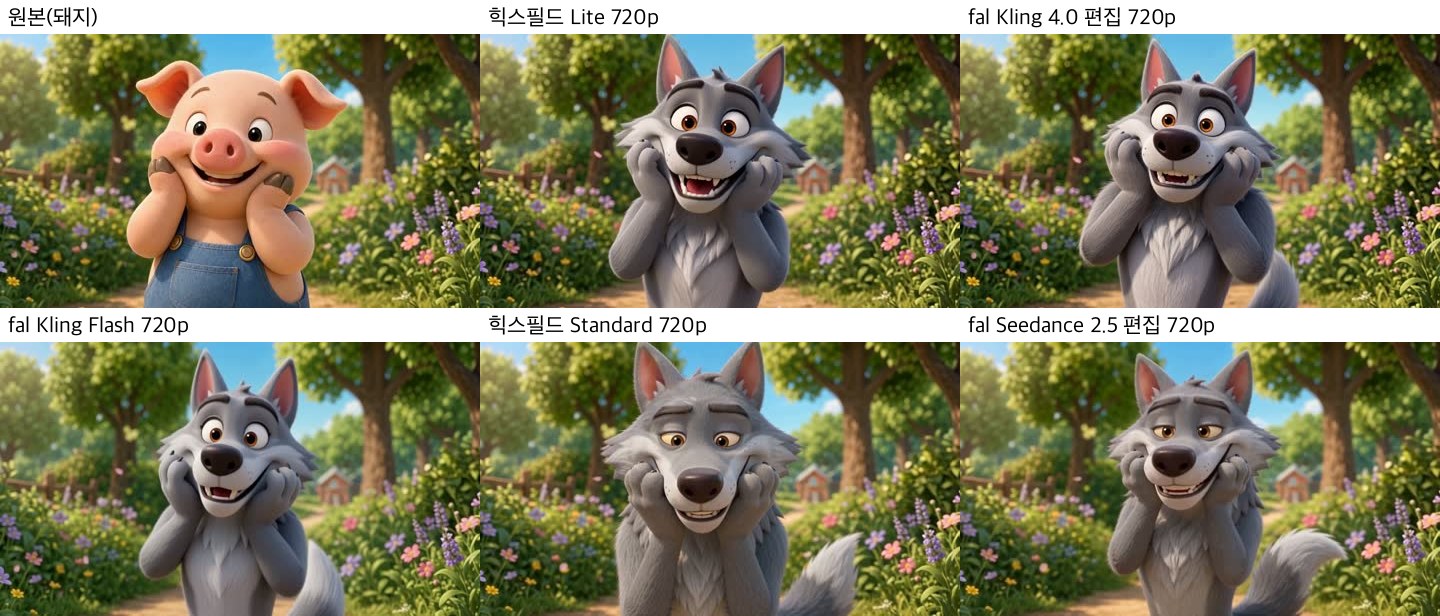
① 시험 A — 돼지 → 늑대. 사용자 지시문은 비웠습니다.
TASK
Edit Video 1. Replace the animated piglet in overalls with the gray anthropomorphic wolf in Image 1. Each image supplies the complete character, including identity, body, anatomy, silhouette and clothing, with nothing kept from the source figure. The blue denim overalls disappear. Video 1 controls the original performance, blocking, interactions, camera movement, framing, cuts and timing; everything outside the listed replacements keeps its look from Video 1.

REFERENCES
Image 1: the complete gray anthropomorphic wolf with upright pointed ears, gray fur, long muzzle, dark nose, amber eyes, fluffy chest fur, large paws, and bushy tail; use its full body, face, fur and proportions; ignore its crossed-arm pose.

SOURCE VIDEO
Video 1 shows the centered character holding both paws to its cheeks in delighted surprise on a sunny garden path. One continuous shot, no cuts.

SHOTS
Shot 1 (0.0–3.0s, continuous): Medium close-up, static camera with slight ambient float. The gray wolf fills center frame from torso up, facing forward; head, shoulders, chest and both raised paws are visible, no legs or tail in frame. He holds both large furred paws pressed to his cheeks, with wide amber eyes and an open joyful smile, looking into camera. His torso is supported by the garden path below frame.

SETTING
Keep the original location from Video 1.

NEGATIVE
no extra people, no duplicated or cloned characters, no piglet features, no hybrid of piglet and wolf bodies, no source face, pink skin, brown hooves or blue denim overalls left over, no crossed arms, no morphing or melting paws, no gibberish text, no extra cuts, no new camera moves, no slow motion, no subtitles, clean frame edge to edge.
② 공개 견본 — 춤추는 쥐 셋 → 그림 3장 (4번째 그림은 «ignore»)
TASK
Edit Video 1. Replace the central dancer with Steve from Image 1, the right dancer with the orange-and-white cat from Image 2, and the left dancer with the cybernetic orange-and-white cat from Image 3. Each image supplies the complete character, including identity, body, anatomy, silhouette and clothing, with nothing kept from the source figure. Image 4: ignore. Video 1 controls the original performance, blocking, interactions, camera movement, framing, cuts and timing; everything outside the listed replacements keeps its look from Video 1.

REFERENCES
Image 1: Minecraft Steve, blocky human body, square brown hair and beard, purple-lensed white glasses, teal shirt, blue-purple pants and gray shoes.
Image 2: orange-and-white cat wearing a blue cap with ear flaps and a black sleeveless shirt; keep the readable white shirt text "STOP BEING POOR."
Image 3: orange-and-white cat in a white pixelated cyber helmet with a blue top light, dark visor, glowing amber eyes, and pale robe-like body covering.
Image 4: ignore.

SOURCE VIDEO
Video 1 shows three upright dancers moving rapidly in front of an open food pantry; a brief bright white flash occurs at 3.0s, then the dance continues. One continuous shot, no cuts.

SHOTS
Shot 1 (0.0–10.1s, continuous): Handheld low-angle medium close-up with the same small pans and slight zooms. Steve fills the center foreground, dancing upright with rapid square arms, torso turns, and feet planted on the tile; the cybernetic cat dances at left, partly clipped by the frame edge; the capped cat dances at right while raising its arms. At 3.0–3.5s keep the brief bright white flash, then all three continue the same fast dance and rotations on the pantry floor.

SETTING
Keep the original kitchen pantry from Video 1: open white cabinet doors, crowded grocery shelves, scattered food on the tile floor, and harsh camera-facing spotlight with hard shadows.

NEGATIVE
no extra people, no duplicated or cloned characters, no source animal bodies, fur, tails, paws or costumes, no hybrid of source and target bodies, no morphing or melting block limbs or cyber helmet, no unreadable shirt text, no gibberish text, no extra cuts, no new camera moves, no slow motion, no subtitles, clean frame edge to edge.
③ 공개 견본 — 거대한 남자 → 사자 고양이 (그림 2장 = 같은 대상 두 각도 · 컷 3개)
TASK
Edit Video 1. Replace the giant man with the orange tabby lion-cat shown in Image 1, with Image 2 as its matching second view. Each image supplies the complete character, including identity, body, anatomy, silhouette and clothing, with nothing kept from the source figure. Keep the pedestrians, yellow taxis, helicopters, skyscrapers, and all other elements unchanged. Video 1 controls the original performance, blocking, interactions, camera movement, framing, cuts and timing; everything outside the listed replacements keeps its look from Video 1.

REFERENCES
Image 1: orange tabby cat with white paws and chest, amber eyes, fluffy striped tail, and a large shaggy orange lion mane; use its complete cat body, face, fur, mane and scale.
Image 2: matching second view of the same orange tabby lion-cat; use its thick striped fur, curled fluffy tail, round ears and lion mane.

SOURCE VIDEO
Video 1 shows a colossal lion-cat advancing down a Midtown Manhattan street as pedestrians run toward camera, then aerial views as it places its right front paw on a glass skyscraper and watches circling helicopters. Keep both hard cuts exactly in place.

SHOTS
Shot 1 (0.0–3.8s, continuous): Low-angle street view with subtle handheld retreat. The colossal orange tabby lion-cat fills center frame, towering above traffic, advancing with the source step timing and looking forward and slightly down; its paws contact the asphalt while pedestrians run through the foreground over its lower legs. hard cut
Shot 2 (3.8–6.6s, hard cut): Medium airborne view through the helicopter door frame. The giant lion-cat's upper body is centered at skyscraper height; its right front paw lies flat against the glass facade as it turns its tabby face toward the camera, with helicopters circling upper-left. hard cut
Shot 3 (6.6–10.0s, hard cut): Extreme worm's-eye full-body view straight up. The colossal orange tabby lion-cat stands centered beside the glass tower, right front paw braced flat on the facade, mane and striped tail clearly intact, head tilted up toward the two helicopters overhead.

SETTING
Keep the original Midtown Manhattan street and skyscraper corridor from Video 1: asphalt, sidewalks, yellow taxis, glass facades, reflections, and overcast daylight.

NEGATIVE
no extra people, no duplicated or cloned characters, no hybrid of source man and target cat bodies, no source bomber jacket, hoodie, jeans, belt or footwear left over, no morphing or melting paws, mane or tail, no human hands, no gibberish text, no extra cuts, no new camera moves, no slow motion, no subtitles, clean frame edge to edge.
영상은 이 페이지에서 바로 재생됩니다. 같은 영상 받기: https://momentus-dl.pages.dev/d/ztBz6kCM4v
힉스필드에서 직접 5편을 만들었습니다(144크레딧). 우리 쪽은 fal 로 7편을 만들었습니다.
위 줄: 힉스필드 Lite ↔ 우리 Kling · 아래 줄: 힉스필드 Standard ↔ 우리 Seedance
| 힉스필드 Lite | 후보 | 크기 | 장면 수 | 맞은 항목(6개 중) |
|---|---|---|---|---|
| 720p → 1260×720 | Kling 4.0 편집 | 1260×720 ✅ | 97 → 힉스필드가 96 으로 자름 ✅ | 6 |
| Kling Flash | 1268×724 ❌ | 97 | 1 | |
| Seedance 2.5 | 1270×724 ❌ | 89 ❌ | 1 | |
| 1080p → 1904×1088 | Kling 4.0 편집 | 1904×1088 ✅ | 97 ✅ | 6 |
| Seedance 2.5 | 1906×1088 ❌ | 89 ❌ | 0 |
맞은 항목 여섯 가지는 다음과 같습니다. 1. 크기 2. 장면 수 버릇 3. 압축 방식 4. 원가 공식 5. 장면 닮음 1위 6. 움직임 닮음 1위
Kling O3 는 가로 720 미만을 거절해 후보에서 빠졌습니다.
힉스필드에서 새로 만들지 않았습니다. 남이 만든 공개 결과를 받아 와 견줬습니다. 그림은 왼쪽부터 원본 · 힉스필드 Lite · 우리 Kling 4.0 편집입니다(3초 장면).
| 견본 | 힉스필드 | 우리 Kling | 크기 |
|---|---|---|---|
| 세로 6초 · 720p · 그림 1 | 720×1280 · 145장면 | 720×1280 · 145장면 | ✅ |
| 세로 12초 · 720p · 그림 4 | 720×1280 · 269 | 720×1280 · 265 | ✅ |
| 세로 10초 · 1080p · 그림 2 | 1080×1920 · 242 | 1080×1920 · 241 | ✅ |
| 가로 20초 · 720p | 1116×836 · 476 | 1116×836 · 481 | ✅ |
| 정사각 25초 · 720p | 940×940 · 579 | 940×940 · 577 | ✅ |
세로 6초 — 왼쪽 원본 · 가운데 힉스필드 Lite · 오른쪽 우리 Kling
세로 12초 · 그림 4장 — 왼쪽 원본 · 가운데 힉스필드 Lite · 오른쪽 우리 Kling
세로 10초 · 1080p — 왼쪽 원본 · 가운데 힉스필드 Lite · 오른쪽 우리 Kling
가로 20초 — 왼쪽 원본 · 가운데 힉스필드 Lite · 오른쪽 우리 Kling
정사각 25초 — 왼쪽 원본 · 가운데 힉스필드 Lite · 오른쪽 우리 Kling
| 구분 | 내용 | 시험이 더 필요한가 |
|---|---|---|
| ✅ 끝 | Lite 의 AI = Kling 4.0 영상 편집 · 720p·1080p · 크기·장면·원가·화면 일치 | 아니요 |
| 만들 때 고를 것 | 지시문을 쓸 LLM(§2 프롬프트를 넣을 모델). 힉스필드가 어느 모델을 쓰는지는 밖에서 알 수 없음 | 시험이 아니라 만들면서 품질을 보고 고름 |
| 쓰임새에 따라 | 그림 5장 이상 넣는 방식 · fal 이 거절하는 캐릭터 내용(Kling 직접 창구 계약으로 풀림) | 그 기능이 필요할 때만 |